

Feature SDKs (Enterprise)
app_blackbox_recorder Enterprise
- Tier
- Enterpriseversion 2.1.5
- Command
archipelago generate app_blackbox_recorder- Generates
features/app_blackbox/app_blackboxfeatures/app_blackbox/app_blackbox_metrics
- Generates first
- shared_consent, shared_identifiers, test_prereq, app_blackbox, app_debuggerwhen needed and missing, so there is nothing to install first
- Depends on
- flutter_l10ngenerate these first
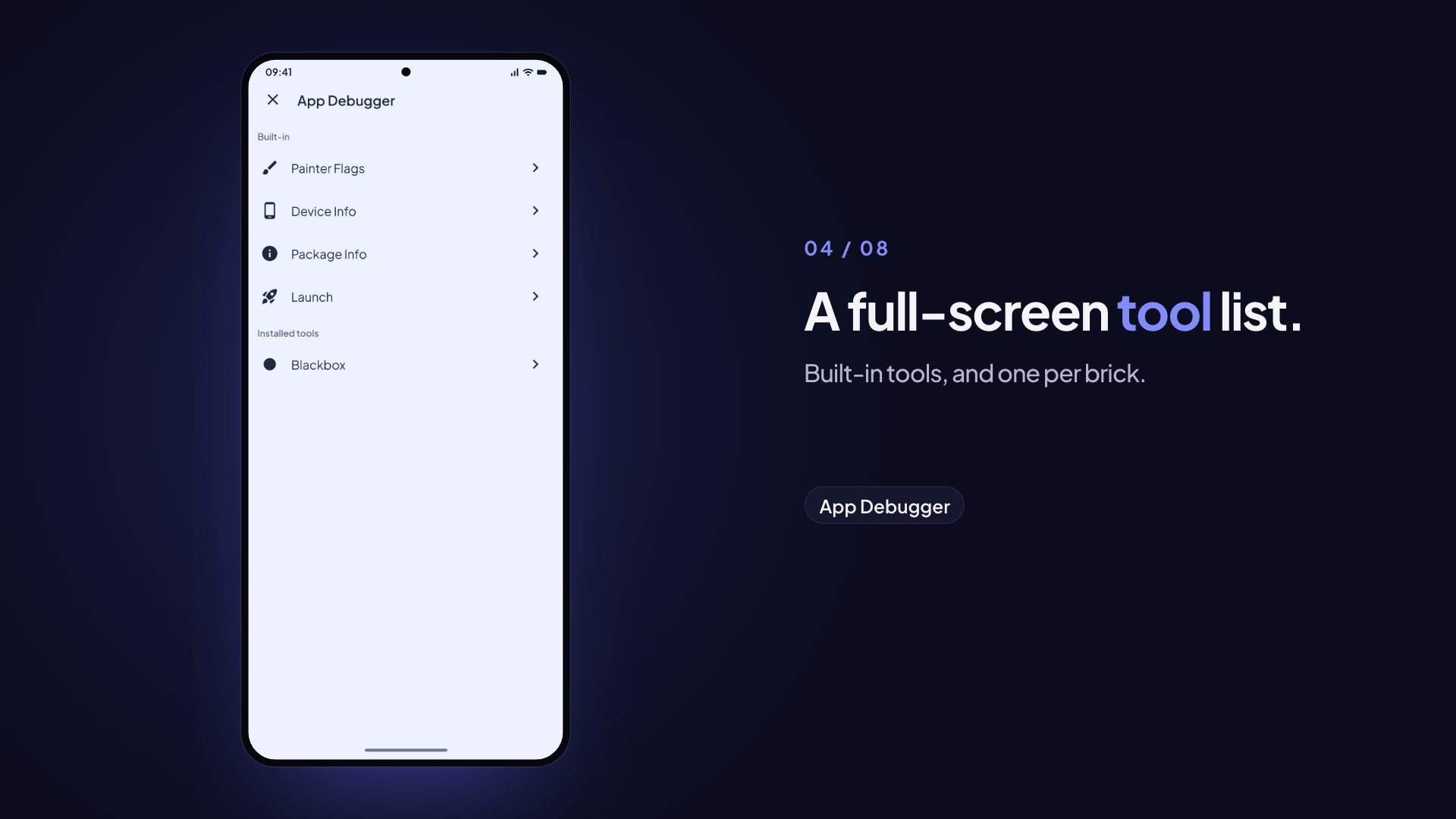
Add-on that turns the free
app_blackboxstub into a real session recorder: device metrics and custom events serialised into a.bbxbundle, viewable in the Blackbox Viewer. Screen capture, filesystem events and cloud sync come from theapp_blackbox_capturebrick.
This is a separate brick from app_blackbox
app_blackbox (free, own page: /bricks/app-blackbox) generates only the SessionRecorderSDK contract (app_blackbox_api) and an inert production-flavor stub (app_blackbox_noop). This brick, app_blackbox_recorder, is what actually generates the app_blackbox orchestrator package (the real SessionRecorderSDKImpl, the Blackbox debugger tool) plus the native metrics package. Nothing in this brick is usable without generating app_blackbox first.
For the whole flow, from recording to the viewer, read the Blackbox guide. Set up cloud sync end to end with the Blackbox cloud sync guide.
Variables
| Variable | Type | Default | Description |
|---|---|---|---|
uiKitPackageName | string | app_ui_kit | The UI kit package the Blackbox panel page uses for context.colors and context.typography. pre_gen reads it from archipelago.yaml, or finds the packages/*_ui_kit package, so you rarely set it |
prefix | string | App | UI kit class prefix, for example Acme for AcmeTheme. pre_gen reads it from archipelago.yaml (project.prefix), so you rarely set it |
Recording options are not brick variables. Configure recording at runtime through the BlackboxConfig passed to start().
Prerequisites
None to do by hand. hooks/pre_gen.dart checks archipelago.yaml and generates any missing hard dependency through SubBrickGenerator before it continues:
app_blackbox(free) providesapp_blackbox_apiandapp_blackbox_noop.app_debuggerprovidesapp_debugger_api, which the orchestrator imports for its debugger tool.shared_consent(free) providesshared/consent_apiandshared/consent_impl, and insertsConsentInitializer.initializebeforeinitializeInjector()inbootstrap.dart. Projects created byflutter_modular_monorepoalready have both packages, sopre_genchecks forshared/consent_api/pubspec.yaml, notarchipelago.yaml. Only a project created before consent shipped gets the brick (1.17.0 and later).shared_identifiers(free) providesshared/identifiers, which the recorder'sapp_blackboxpackage depends on.pre_genchecks forshared/identifiers/pubspec.yamlthe same way (1.17.1 and later).
The launch tracker is optional, so pre_gen does not generate it (1.19.0 and later; 1.18.0 did). Sessions carry the launch trace (launch_trace.json, shown in the viewer's Launch view) when the launch_tracker_sdk brick is installed. Every generated app has it. The orchestrator does not depend on it: it reads the trace through the LaunchTraceSource port from app_blackbox_api. When infrastructure/app_launch_tracker_impl exists and has the LaunchTrace API (launch_tracker_sdk 3.1.0 or later; an older tracker gets a warning and no glue), post_gen adds the glue to the host app:
- writes
lib/host/initializers/launch_trace_source_initializer.dart, withLaunchTraceSourceInitializerand theTrackerLaunchTraceSourceadapter; - registers the initializer in the
archipelago:pre_launch_importsandarchipelago:pre_launch_initializersmarker regions ofpre_launch_initializer.dart, so the source exists before a session can stop.
Running the hook again changes nothing. If you install the launch tracker after the recorder, run the recorder brick again to add the glue. A host without the pre-launch markers gets a warning that says what to add by hand.
Version 2.0.0 needs app_blackbox 2.10.0 or later (1.15.0 to 1.17.x needed 2.8.0, 1.14.0 needed 2.7.0, 1.13.0 needed 2.6.0, 1.12.0 needed 2.5.0, 1.10.0 needed 2.4.0, 1.8.0 needed 2.3.0) and the DebugOverlayPort contract in app_debugger_api (app_debugger 2.0.0, or a customised debugger that adds it, see Customised debugger); 1.12.0 to 1.17.x needed app_debugger 1.11.0. 2.0.0 added BundleWriter.setFrameTimings, 2.1.0 added BundleUploader.autoSync, endpointHost, requestDrain() and clearFailed(), 2.2.0 added SessionRecorderSDK.pause(), resume() and state, and 2.3.0 added the capability-module stubs to app_blackbox_noop, 2.4.0 added MetricType.storage, 2.6.0 added isScreenRecording, screenCaptureStatus and the screen recording cap, 2.7.0 added the app version and device details, 2.8.0 added the refresh rate and frame budget, 2.9.0 added BundleWriter.setLaunchTrace, and 2.10.0 added the LaunchTraceSource port and BlackboxHost. When an older app_blackbox is already installed, pre_gen stops with an error and changes nothing. It reads the version of features/app_blackbox/app_blackbox_api/pubspec.yaml, because archipelago.yaml records brick names only. Regenerate the latest app_blackbox over the existing packages first (archipelago generate app_blackbox), then run the recorder again.
Usage
Interactive
archipelago generate app_blackbox_recorderNon-interactive (CI)
archipelago generate app_blackbox_recorder --config my_config.jsonGenerated Structure
features/
└── app_blackbox/
    ├── app_blackbox/                 # Real orchestrator (this brick, NOT the free one)
    │   └── lib/src/
    │       ├── blackbox_panel_page.dart
    │       ├── session_recorder_sdk_impl.dart
    │       └── di/
    └── app_blackbox_metrics/         # Native metrics collector (EventChannel)
        ├── android/ ios/
        └── lib/src/di/
app_blackbox_capture generates app_blackbox_capture, app_blackbox_capture_noop, app_blackbox_filesystem and app_blackbox_recording next to them.
app_blackbox_api and app_blackbox_noop are not generated by this brick — they come from the free app_blackbox brick and are left untouched.
API
SessionRecorderSDKImpl implements the SessionRecorderSDK contract (app_blackbox_api, generated by the free brick):
abstract interface class SessionRecorderSDK() implements FeatureSDK {
  bool get isRecording;                        // true while recording or paused
  ValueListenable<RecordingState> get state;   // idle, starting, recording, paused, stopping
  ValueListenable<bool> get isScreenRecording; // hide amounts while true
  ValueListenable<ScreenCaptureStatus> get screenCaptureStatus;
  SessionMetadata? get currentSession;
  Stream<MetricSample> get metricStream;
  Future<String> start({BlackboxConfig config = const BlackboxConfig()});
  void captureCustomEvent(String name, {Map<String, dynamic>? properties});
  Future<void> pause();
  Future<void> resume();
  Future<BundleArchive?> stop();
  Future<void> cancel();
}
pause() stops every collector until resume(). The bundle records each pause in session.pauses and writes session.paused and session.resumed events, and summaries leave the paused time out.
BlackboxConfig (also app_blackbox_api) is the real, per-call runtime toggle — pass it to start():
final sessionId = await getIt<SessionRecorderSDK>().start(
  config: const BlackboxConfig(
    enableScreenRecording: true,       // default: false; see Screen recording
    maxScreenRecordingSeconds: 120,    // video cap; 0 = none
    screenRecordingBitRate: 2000000,
    enableFilesystemSnapshots: true,   // default: true
    filesystemSnapshotIntervalSeconds: 30,
    metricSampleIntervalMs: 1000,
    storageSampleIntervalSeconds: 10,  // the storage metric's own pace
    maxDurationSeconds: 300,           // auto-stop; 0 disables
  ),
);

getIt<SessionRecorderSDK>().captureCustomEvent(
  'checkout_initiated',
  properties: {'items': 3, 'currency': 'IDR'}, // never amounts or PII
);

// From a feature package, with no DI access. A no-op in the production
// flavor, where app_blackbox_noop never attaches.
BlackboxEvents.captureCustomEvent('sync.cycle', properties: {'changes': 12});

final archive = await getIt<SessionRecorderSDK>().stop();
// archive.bytes is the .bbx ZIP, archive.filename is a suggested filename.
// stop() returns null if isRecording was already false.
start() throws StateError if a session is already recording. stop() and cancel() do nothing when isRecording is false, and stop() returns null.
Consent and PII
- Consent fails closed.
start()throwsStateErrorunlessConsentGateRegistry.instancegrantsConsentPurpose.diagnostics. If the user withdraws that grant during a session, the session is cancelled and nothing is kept. The Blackbox tool has a Diagnostics consent switch that records the user's decision through the installedConsentGate, so a profile build or a release build of an internal flavor can record. For QA in debug builds,--dart-define=CONSENT_DEBUG_GRANT_ALL=truealso works. Do not seed a granted state in code. - Custom event properties pass through the app's
TelemetryScrubber(channel: 'blackbox'). Theno_pii_in_telemetrylint (app_lints 1.1.0 and later) flags personal keys in map literals passed tocaptureCustomEvent. - Filesystem capture skips every path that matches
BlackboxConfig.filesystemExcludePatterns. The default isdefaultFilesystemExcludePatterns: key-value stores, databases, cookies, keychains and names that look like credentials. Every kept path and file name also passes throughTelemetryScrubber.scrubText. - Nothing is left behind by the recorder.
start()checks consent again before the session goes live.stop()checks it again before it finalizes, and returnsnullif the grant is gone.stop()also deletes the temporary screen-recording file. The recorder deletes its own saved sessions and the sync outbox when the user withdraws diagnostics consent (see Recorded sessions). If your app keeps other bundles with its ownBundleStore, callBundleStore.deleteAll()then too. - Device details are read at start with
device_info_plusandpackage_info_plus, in debug builds only. The recorder never writes a device identifier or a user-set device name. - Recorder files are not recorded. Filesystem events and snapshots skip the screen-recording output and the whole
blackbox/directory. Paths are redacted one/segment at a time.
DI and wiring
Each generated package declares its DI module in an archipelago: block in its own pubspec.yaml, read by monorepo_toolkit generate host-registry:
# app_blackbox/pubspec.yaml
archipelago:
  di_modules:
    - class: AppBlackboxMetricsPackageModule
      import: package:app_blackbox/app_blackbox.dart
    - class: AppBlackboxPackageModule
The recorder (app_blackbox) needs only the metrics collector. It looks up the filesystem watcher, the snapshotter, the screen recorder and the BundleUploader in GetIt each time it needs them and skips what is not registered, so it records metrics and custom events on its own. app_blackbox_capture's AppBlackboxCapturePackageModule registers all four, lazily, so module order does not matter.
app_blackbox_metrics is not an app dependency. app_blackbox depends on it and re-exports its module. build-prepare --flavor production swaps app_blackbox for app_blackbox_noop, which takes the metrics package and its native plugin out of the production dependency graph. The noop exports empty stubs with the same class names, so the injector needs no edit on the swap.
post_gen.dart drops any old direct app dependency on the capability packages and their injector imports, removes the free tier's noop registration, and regenerates the injector regions from the manifests. Running it again over an older project upgrades it. It removes only the exact entries an older version wrote; a customised entry stays, with a warning that it still ships in the production flavor (the leak guard then fails that build). build_prepare.yaml still owns the swap at the pubspec level.
SessionRecorderSDKImpl self-registers with FeatureSDKRegistry and DebuggerPanelPageRegistry from its constructor, so it must be eagerly resolved after initializeInjector() or the Blackbox tool never appears. post_gen.dart patches this in for you: it injects GetIt.I<SessionRecorderSDK>(); at the archipelago:debug_panel_pages marker (provided by the app_debugger brick), imports app_blackbox_api there and adds it as a path dependency of that package. The marker moved between app_debugger versions, so the hook uses the first file that has it: app_debugger's lib/src/di/debug_tools.dart (2.0.0 and later), its lib/src/app_debugger_sdk_impl.dart (1.3.0 to 1.15.x), then the app's lib/bootstrap.dart (older). A file that already resolves SessionRecorderSDK is left as it is. If an installed app_debugger has the marker nowhere, pre_gen prints the lines to add and stops before it writes any file. The constructor also attaches the recorder to BlackboxEvents.
Testing
SessionRecorderSDKImpl.initialize(), which the pre-launch sweep runs after initializeInjector(), loads the record-control settings and builds the BundleUploader; both call path_provider's getApplicationSupportDirectory(). app_blackbox ships AppBlackboxTestPrerequisite in package:app_blackbox/testing.dart and declares it under archipelago: test_prerequisites, so monorepo_toolkit generate test-harness adds it to the app's composition-root harness (see Testing and test_prereq).
build_prepare integration
dart run monorepo_toolkit build-prepare --flavor production               # before a production build
dart run monorepo_toolkit build-prepare --check-leaks --flavor production # after it
dart run monorepo_toolkit build-prepare --restore                         # back to development
Internal flavors (internal_flavors, default development, staging, alpha, beta) keep the recorder, also in release mode, so QA and beta builds can record sessions. Only the production flavor, and any flavor not in that list, gets app_blackbox_noop. The generated Fastfile passes the build's own flavor for you.
post_gen.dart registers the app_blackbox ↔ app_blackbox_noop mapping in build_prepare.yaml for you (via BuildPrepareHelper.addMapping), and lists app_blackbox_metrics under debug_only, so the leak guard fails a production build that depends on it directly.
Dependencies
app_blackbox(free) andapp_debugger. Both are hard dependencies, and the hook generates them when they are missing (see Prerequisites).- The native metrics package (
app_blackbox_metrics) reads AGP/Kotlin/compileSdk/Java versions from the workspace's owngradle/libs.versions.toml(provided byflutter_modular_monorepo) rather than hardcoding them — verified in each package'sandroid/build.gradle. A project generated before the catalog existed has none, sopost_gencreates it with the AGP and Kotlin versions from the app'sandroid/settings.gradle(.kts)and the Java version fromandroid/app/build.gradle(.kts). An existing catalog is never changed.
Platform Setup
The hooks do not touch AndroidManifest.xml or Info.plist, and the recorder needs no platform step. Screen capture's platform steps come with the app_blackbox_capture brick.
Floating record control
For UI drivers such as Marionette, the collapsed control has the key blackbox_record_dot and the open menu blackbox_record_menu.
Internal-flavor builds get a floating record control over every screen. It is part of app_blackbox, so production-flavor builds lose it with the rest of the recorder. The host app needs no code: the control inserts itself into the root Navigator's Overlay when the SDK initializes.
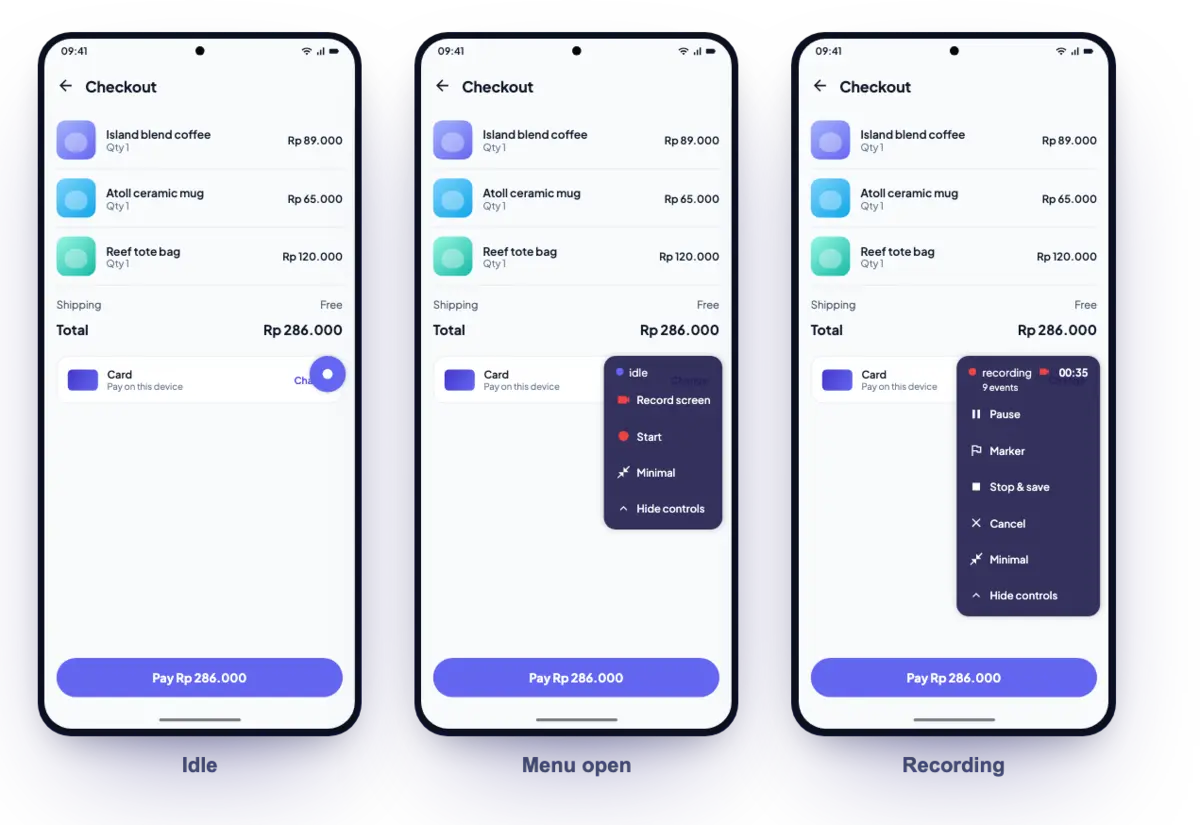
- Turn it on in the Blackbox panel with Show floating recorder. Show it while recording (on by default) shows it during any live session, so a session started from the panel or from code can be stopped from any screen.
- Tap the dot for Start, Pause / Resume, Marker, Stop & save and Cancel. Cancel asks before it discards the session.
- Marker writes a
session.markerevent at that moment. Long-press it to add a short label (scrubbed like any event property). There is no marker while the session is paused, because nothing is captured then. - While recording, the menu shows how many events the session has so far.
- Start without diagnostics consent shows a short message instead of an error: nothing is recorded until the user grants it.
- Record screen (above Start) turns screen capture on for the next session, like the switch in the Blackbox tool. A camera icon shows on the dot while the screen is captured.
- The dot shows the state: idle, recording with a timer (paused time left out), paused, saving, saved or failed. After a stop, a card shows the session id and, with cloud sync on, the upload status.
- Drag it anywhere. It snaps to the nearest side edge and moves clear of the debugger FAB (
DebugOverlayPort.fabRect). - Every button is a 48 dp target that TalkBack and VoiceOver can activate.
- It never animates while recording (the timer ticks once a second), so it does not skew the frame and CPU data it records.
- Minimal shrinks it to a small dot, so it barely shows in the screen recording. The touch target stays 48 dp.
- The toggles, minimal mode and position persist in
<storage dir>/blackbox/record_control.json(app support unless the host setsBlackboxHost.storageDirectory). - Colours, spacing, corners and text come from the UI kit (
context.colors,context.spacing,context.radius,context.typography). When the theme has no kit extensions it falls back to the brand palette, kept in one place (RecordControlStyle).
Labels
The Blackbox tool, the sessions list and the floating control are localized with app_blackbox's own slang translations: l10n/en.i18n.json and l10n/id.i18n.json in the package, generated as blackboxL10n. They follow the app locale from locale_core (AppLocaleController), so a language change in the app shows on the next rebuild. To add a language, add l10n/<locale>.i18n.json to the package and run melos run build.
The control and the sessions list read their strings through BlackboxLabels in app_blackbox_api, and the recorder sets BlackboxLabels.builder to these translations unless the host already set one. To feed your own translations instead, set it from host code (it compiles in the production flavor too, where nothing reads it):
BlackboxLabels.builder = (context) => BlackboxLabels(
  start: context.l10n.blackbox.start,
  consentRequired: context.l10n.blackbox.consentRequired,
  events: (n) => context.l10n.blackbox.events(n: n),
);
The builder runs on every build of the control, so a locale change shows on the next rebuild. Colours in the tool and the floating control come from the UI kit's tokens.
Show results in your own UI
After a stop, the control shows a card and the Blackbox tool a snackbar. To show the result in your app's own UI instead, set BlackboxHost.resultPresenter from host code before initializeInjector() (it lives in app_blackbox_api, so it compiles in the production flavor too, where nothing calls it):
BlackboxHost.resultPresenter = (context, result) {
  AppSnackbar.show(
    context,
    message: result.message,
    isError: result.isError,
    actionLabel: result.onView == null ? null : 'View',
    onAction: result.onView,
  );
  return true; // false keeps the built-in card or snackbar
};
result.message is already localized through BlackboxLabels. onView is set when a bundle was saved and shares it through the platform share sheet, the same as Share in the sessions list. context is the control's (in the root Overlay) or the tool's (in the debugger).
Customised debugger
The control needs two things from the debugger: where its FAB is, and which Navigator is its own (the control must attach to the app's Navigator, not the debugger's). That is the DebugOverlayPort contract in app_debugger_api:
abstract interface class DebugOverlayPort() {
  static DebugOverlayPort? current;
  ValueListenable<Rect?> get fabRect;
  GlobalKey<NavigatorState>? get navigatorKey;
}
app_debugger 2.0.0 and later ships it, and AppDebuggerSDKImpl installs DebugOverlayHost as DebugOverlayPort.current. With no port installed the control still works; it only stops avoiding the FAB.
pre_gen checks that some file under app_debugger_api/lib declares DebugOverlayPort, not the app_debugger version. An app with an older or edited debugger (an own overlay registry, a debugFabRect, extra panel pages) adopts the recorder without regenerating app_debugger:
Copy
features/app_debugger/app_debugger_api/lib/src/debug_overlay_port.dartfrom the app_debugger brick (or template_base) into yourapp_debugger_api/lib/src/. It imports only Flutter.Export it from
app_debugger_api.dart.Implement it over what your debugger already has and install it where your debugger starts:
dartclass _MyOverlayPort() implements DebugOverlayPort { @override ValueListenable<Rect?> get fabRect => debugFabRect; @override GlobalKey<NavigatorState>? get navigatorKey => null; // no own Navigator } DebugOverlayPort.current = _MyOverlayPort();Run
app_blackbox_recorderagain.
A project that still carries the older RecorderFab control (its recorder_fab_* files and DebuggerOverlayRegistry layer) deletes it first; the recorder brings its own control.
Recorded sessions
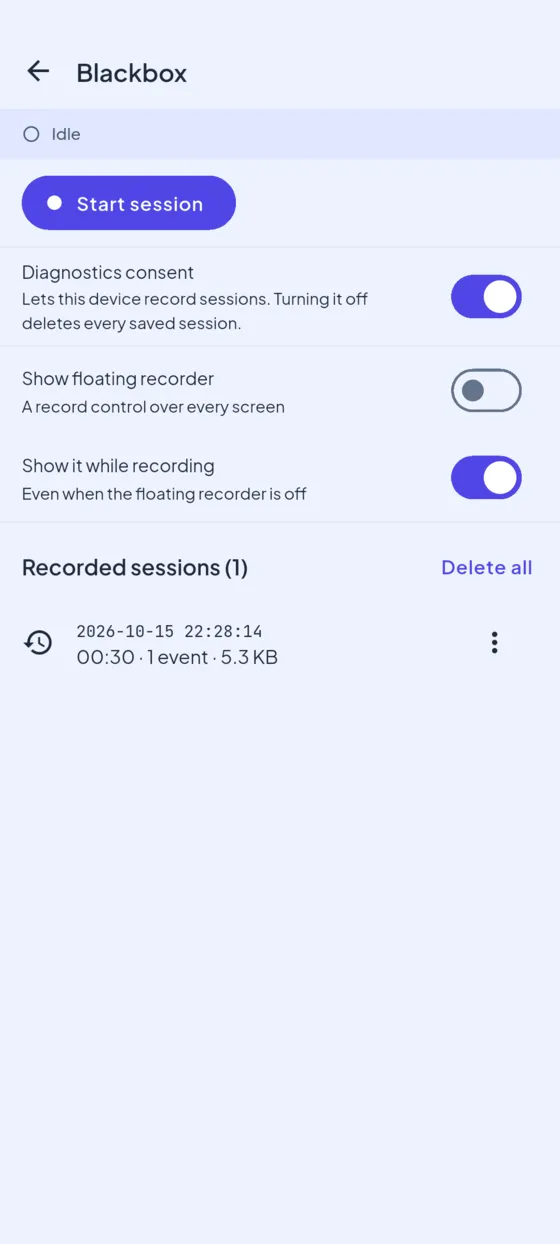
Every stopped session is saved on the device, from the panel or the floating control. The Blackbox tool lists them newest first with start time, recorded time (paused time left out), event count, size and a video icon. Each row has Share, Copy path and Delete; Delete all clears the list. Both delete actions ask first. Share opens the platform share sheet (share_plus) with the .bbx file, so you can save it to Files or a drive, or send it to a computer and open it in the viewer. The list reloads after every save or delete; pull down on the tool to reload it by hand.
Files go to
<app support>/blackbox/sessions/(getApplicationSupportDirectory) by default, not Android external storage, because a bundle can hold screen video. The newest 20 are kept.BlackboxHost.storageDirectorymoves everything the recorder writes (sessions, outbox, control settings) under another directory. Set it beforeinitializeInjector(). On an internal build that is not debuggable, Android's external files dir makesadb pullwork:dartif (Platform.isAndroid) { BlackboxHost.storageDirectory = () async => (await getExternalStorageDirectory())!; }Then
adb pull /sdcard/Android/data/<applicationId>/files/blackbox/sessions/. External app storage is readable over USB and, before Android 10, by other apps, so keep it to internal builds.Withdrawing diagnostics consent deletes them. So does an app start without consent.
The list reads
session.msgpackonly, on a background isolate. Bundles from app_blackbox 2.5.0 storeeventCountthere; older ones are counted fromevents.msgpack.To pull a bundle off an Android debug build:
adb exec-out run-as <applicationId> cat files/blackbox/sessions/<id>.bbx > <id>.bbx(the path the row copies, relative to the app data dir). Or turn on cloud sync.With cloud sync on, a bundle also sits in the outbox until it uploads.
A failed save (for example a full disk) shows
Failed: <reason>on the control and in the tool, and the list does not show it.The live event count in the control counts every event written. Past
BlackboxConfig.maxEventsthe bundle keeps only the newest, so the saved count can be lower.The purge runs in internal-flavor builds only. A production build (
app_blackbox_noop) installed over an internal build with the same signing key leaves earlier saved sessions in app-private storage until the app is uninstalled or its data is cleared.
Cloud sync
Cloud sync comes from the app_blackbox_capture brick. Without it the Blackbox tool hides the Cloud sync section and sessions stay on the device.
Viewing Sessions
Sign in at archipelago.banuacoder.com/blackbox and drop a .bbx file on the page. The file is parsed in your browser tab and never uploaded. The viewer shows every signal on one time axis, a per-second table, the filesystem tree at each snapshot, events and markers, and the screen recording in step with the playhead. Its Docs page explains every track and figure. See Open a session in the viewer.
Agent skill: blackbox-sessions
The brick writes the blackbox-sessions agent skill to .claude/skills/blackbox-sessions/ and adds its row to the skill index in AGENTS.md. Given a .bbx file, an AI agent runs the skill's scripts/bbx_report.py (Python 3 and pip install msgpack) to read the session as text: the device and build, the events and markers with their times, the worst seconds of each metric, the frames over budget split into build and raster time, the file activity and the slowest launch steps. --around <seconds|marker label> lists everything within a few seconds of a moment. The skill then tells the agent how to read each signal, and how to add BlackboxEvents and markers so the next session shows the flow.
The skill ships with this brick because only the recorder produces sessions, so it is Enterprise like the brick. Running the brick again rewrites the skill folder.
Bundle format (.bbx)
The canonical copy lives next to the code, at features/app_blackbox/app_blackbox_api/BUNDLE_FORMAT.md, and ships with the app_blackbox brick. This section repeats it for the viewer and for other readers. The format only grows by adding things. Readers must ignore unknown keys, metric types and ZIP entries.
A .bbx file is a ZIP. It holds up to 10 entries, and each .msgpack entry is one MessagePack value:
| # | Entry | Content |
|---|---|---|
| 1 | session.msgpack | A map: sessionId, deviceInfo (platform, version, and from 2.7.0 the device keys listed under Session metadata on the app_blackbox page), config (the BlackboxConfig JSON), startedAt, stoppedAt and, from v2, schemaVersion: 2 and dropped {metrics, events, filesystemEvents, filesystemSnapshots, frames}. Added later in v2: pauses (2.2.0), eventCount (2.5.0), amountsMasked (2.6.0), appVersion, buildNumber and packageName (2.7.0), refreshRate, frameBudgetUs and buildMode (2.8.0) |
| 2 | metrics.msgpack | A list of {timestamp, type, value, extras?} |
| 3 | events.msgpack | A list of {name, timestamp, properties?}. The recorder itself writes the reserved names app_lifecycle, session.paused, session.resumed, session.marker (with an optional label) and screen_recording.denied, .failed and .limit_reached |
| 4 | filesystem_events.msgpack | A list of {type: created/deleted/modified/movedFrom/movedTo, path, timestamp, oldPath?} |
| 5 | filesystem_snapshots.msgpack | A list of {timestamp, rootItems: [{name, path, sizeBytes, isDirectory, children}]} |
| 6 | sync.msgpack | A list of [offsetMs, frameIndex], one pair for each frameJank sample. The video frame index assumes 60 fps and skips paused time |
| 7 | recording.mp4 | Present only when screen recording ran |
| 8 | summary.json | From app_blackbox 2.0.0: session percentiles (frame build, raster and total time; FPS; CPU; memory; network; battery drain; thermal time; jank frames). version 2 from 2.8.0 adds frameBudgetUs, jankFrames against the display budget and jankFrames60 against 60 Hz. The viewer's Docs page explains each figure |
| 9 | frames.msgpack | Present only when frames were captured: per-frame offsetMs (delta-encoded), buildUs, rasterUs and totalUs. BlackboxConfig.maxFrameTimings caps it, and 0 turns it off |
| 10 | launch_trace.json | From app_blackbox 2.9.0 and app_blackbox_recorder 2.0.0: the app's launch as LaunchTrace v1 (schemaVersion: 1), plain JSON. The recorder reads it at stop from the registered LaunchTraceSource (from 1.19.0; the host adapter returns AppLaunchTracker.lastLaunchTrace, or launchTraceSnapshot() while the launch still runs). Left out when no source is registered (no launch tracker), the read fails or the trace is not v1; the rest of the bundle is still written. Same consent check as the rest of the bundle. Additive, so schemaVersion stays 2. The viewer shows it in the Launch view |
Every timestamp is an ISO-8601 string in device-local time with no UTC offset. Metric type values use camelCase (networkRx, frameJank, connectionType), not snake_case.
type | value unit | Scope |
|---|---|---|
battery | percent, 0 to 100 | device. extras holds the charging state, health, temperature, voltage and current where the platform exposes them. Android writes state, plugged and temperatureC on every sample. iOS has no temperature (no public API) |
cpu | percent, 0 to 100, normalised across all cores | app process (v2). In v1, Android reported the whole device and iOS reported the sum of thread usage |
memory | bytes. Android reports PSS and iOS reports phys_footprint | app process (v2). In v1, Android reported the RAM used by the whole system |
networkRx / networkTx | bytes per second | Android: the app UID. iOS: the whole device (getifaddrs), from v2 |
connectionType | 0 none, 1 wifi, 2 cellular, 3 ethernet, 4 other | device (v2) |
storage | bytes of app data, without caches. Extras: cacheBytes, tempBytes, deviceFreeBytes, deviceTotalBytes | app (v2, app_blackbox 2.4.0). Its own interval, 10 s by default. The directory walk stops at 200,000 entries or 2 s and sets extras.truncated |
thermal | Android 0 to 6, iOS 0 to 3 | device |
fps | vsync callbacks per second (they keep running when Flutter draws nothing; per-frame data is in frames.msgpack) | app |
frameJank | the count of vsync gaps longer than one frame per interval. One frame is 1000 / refreshRate ms (16.67 at 60 Hz; always 16.67 before 2.8.0) | app |
In a v2 sample, extras.scope is process, app or device. A missing schemaVersion means the bundle is v1.
Performance budget
The recorder is a debug tool, but it must not become the performance problem it is recording. These are the budgets for the default BlackboxConfig():
| Cost | Budget | How it is held |
|---|---|---|
| Dart work for each sample (parse + ring-buffer write) | < 20 µs. About 0.7 µs measured | overhead_budget_test.dart (tag perf, run with flutter test --tags perf --run-skipped) |
| Dart memory for the buffers at full caps | about 10 to 15 MB (50,000 samples × about 200 B, plus events) | The caps are ring buffers (maxMetricSamples and the other caps) |
stop() finalise, default 5-minute session | < 1 s. About 0.1 s measured | Asserted |
stop() finalise, full 50,000-sample buffer | < 4 s. About 0.2 s measured | Asserted |
| Native sampling tick (1 Hz, on a background thread or queue) | < 2 ms for each tick, which is below 0.2 % of one core | A design target. It is not benchmarked on a device yet |
| Per-frame callback (FPS and jank only) | O(1) for each frame, on the main thread | Off in lightweight |
Per-tick aggregation is not moved to a background isolate. The Dart side does about 1 µs of work for each sample, and native sampling already runs off the main thread. The only heavy step on the main thread is the one-time, user-triggered stop() finalise.
Lightweight preset
await recorder.start(config: BlackboxConfig.lightweight);This preset samples every 5 s. It skips fps and frameJank, so no per-frame callback is registered. It turns off screen recording and filesystem snapshots, uses smaller buffers, and keeps battery, CPU, memory, network, thermal and connection type. To choose signals yourself, set enabledMetrics on any config. The native collectors skip every disabled signal completely.
Screen recording
Screen recording comes from the app_blackbox_capture brick. Without it the Record screen switch and action are hidden, and screenCaptureStatus stays off. SessionRecorderSDK.isScreenRecording is always available, so host code that hides amounts while recording compiles with or without it.
Upgrading over changed packages
From 2.0.0, post_gen records the files it generated in .archipelago/generated/app_blackbox_recorder.json, and pre_gen checks them before it generates anything, dependencies included. When app_blackbox or app_blackbox_metrics changed since then (changed, added or deleted files), it lists them and stops with Nothing was changed. A project generated before 2.0.0 has no record and stops once. Merge the new version in, or set ARCHIPELAGO_FORCE=1 to overwrite. See Upgrading generated packages.
post_gen also removes a top-level archipelago: manifest from the metrics pubspec. Projects hand-migrated to the 1.8.0 layout kept one, and the injector would then register the module twice.
Upgrading from 1.x
Up to 1.x this brick also generated app_blackbox_filesystem, app_blackbox_recording and the cloud sync uploader. 2.0.0 generates app_blackbox and app_blackbox_metrics only.
A project generated from the 1.x bricks needs three things first. pre_gen checks each one and stops with "Nothing was changed" until it is done:
shared/feature_sdkwithFeatureSDKRegistry.manifests: step 1 of Migrating feature DI (by hand).app_debugger2.0.0 or later (theDebugOverlayPortcontract):archipelago generate app_debugger.app_blackbox2.10.0 or later:archipelago generate app_blackbox.
Then, with screen capture, filesystem events or cloud sync in use, run two commands:
archipelago generate app_blackbox_recorder
archipelago generate app_blackbox_capture
Without capture, only the first. A 1.x project has no generation record, so app_debugger, app_blackbox, this brick and app_blackbox_capture each stop once with "Nothing was changed"; run that command again with ARCHIPELAGO_FORCE=1 if you did not change its packages, or merge the new version in. Mason then asks before it overwrites a file that differs from the template; answer Y (all).
The recorder keeps the capture packages on disk but stops registering them, and warns (in pre_gen and again at the end) that sessions record metrics and custom events only until app_blackbox_capture runs. It deletes the 1.x cloud sync files 2.0.0 no longer generates (app_blackbox/lib/src/di/cloud_sync_module.dart, app_blackbox/lib/src/sync/, app_blackbox/test/sync/), and app_blackbox_capture deletes the 1.x contract files (app_blackbox_filesystem/lib/src/filesystem_snapshotter.dart, filesystem_watcher.dart, app_blackbox_recording/lib/src/screen_recorder.dart), when they are unchanged or the run was forced; a recorded file you changed is kept and listed for you to delete. (A recorder record from a pre-release 2.0.0 run is handed to app_blackbox_capture, which then stops only on files you changed.)
Verified by a real upgrade: a project generated from the 1.17.1 bricks, upgraded as above, passes melos run build, flutter analyze with no errors or warnings, and the production release-strip check.
Known Limitations
.bbxfiles can grow large for long sessions with screen recording enabled — setmaxDurationSeconds, or useBundleStoreto rotate old sessions.
Changelog
Run archipelago brick info app_blackbox_recorder to see the latest published version. Enterprise customers can read the full CHANGELOG.md in the brick source repository.