Skip the story
  1. Flutter CLI and bricks

    Weeks of Flutter setup before your first feature.

    • Folder structure
    • Dependency injection
    • Networking boilerplate
    • CI/CD pipelines
    • Auth from scratch
    • Error handling

    Ship your Flutter app in days, not weeks.

    Archipelago - Generate a production-ready Flutter app in one command | Product Hunt
  2. 01 · Islands

    Every feature is an island.

    Each feature brick generates its own module, with its own local DI container, and registers its own routes: auth_sdk, home_sdk, paywall_sdk, introduction_sdk, feedback_sdk, ai_chat_sdk.

    Add one with archipelago generate <brick-name>. Generate only what your app needs.

  3. 02 · Water

    Islands never touch. The water connects them.

    Features stay separate and meet only through shared infrastructure:

    • Dual GetIt DI. A global container for SDKs, a local one per feature.
    • Feature registry. Features register their routes before the router is built.
    • Shared SDKs. network_sdk, storage_sdk, analytics_sdk, feature_flag_sdk.
    • Tooling in the repo. The devtools/ monorepo toolkit, GitHub Actions or GitLab CI, and Fastlane.
  4. 03 · The A

    Pull back, and the map is the mark.

    Two islands, one channel of water, and a lagoon at the centre. The Archipelago A is the architecture rule drawn as a letter: nothing touches except the water.

    The Archipelago mark: a letter A split by a wave channel into two islands around a lagoon.
04 · One command

From an empty sea to a monorepo.

Install the CLI once. archipelago create asks what you need and generates the whole project.

  1. 1Install the CLIWorks on macOS, Linux, and Windows.
  2. 2Generate your projectPick your bricks and state management: BLoC, Cubit, Riverpod, or Provider.
  3. 3Ship itFastlane, CI, and monorepo tooling come preconfigured.
terminal

Terminal transcript. dart pub global activate archipelago_cli. archipelago create. Step 1 of 5, Preparing configuration. Step 2 of 5, Loading brick. Loaded flutter_modular_monorepo brick. Step 3 of 5, Generating project. Step 4 of 5, Running post-generation hooks. Step 5 of 5, Finalizing. Project created successfully. Next steps: cd my_app, dart pub get, melos bootstrap.

05 · The archipelago

Pick your islands.

Every brick is a self-contained module you generate into your project.

76 bricks: 50 Free, 20 Pro, and 6 Enterprise.

Patterns from years of fintech apps with 20M+ daily users.

Start on the product, not the plumbing.

The CLI and the Free bricks cost nothing. Create an account, then generate your first project.

Install:
dart pub global activate archipelago_cli

In action

Watch the toolkit change real files.

Six commands from a generated project, and the files they touch. Code is trimmed from the reference app the bricks are written from.

Generate

Add a feature to a project you made with archipelago create. The brick scaffolds the package, and its hook adds the module to your app's injector. The SDK registers itself, so its routes exist before the router is built.

archipelago generate feature_monorepo_skeleton? What is the name of your feature module? checkout? Is this a shared feature (API/Impl split)? No? Which state management do you want to use? cubitCopied single feature template to features/checkout✓ Registered ExternalModule(CheckoutGlobalModule)✓ Feature integration completed successfully

Wired into DI. Routes register at pre-launch.

apps/my_app/lib/di/injector.dart
import 'package:app_utilities/app_utilities.dart';import 'package:checkout/checkout.dart';@InjectableInit(  externalPackageModulesBefore: [    ExternalModule(AppUtilitiesPackageModule),    ExternalModule(CheckoutGlobalModule),  ],)Future<void> initializeInjector() => $initGetIt(getIt);
features/checkout/lib/src/checkout_sdk.dartnew file
factory CheckoutSDKImpl.create() {  final sdk = CheckoutSDKImpl._();  // Self-register for auto-discovery by FeatureSDKAppInitializer.  FeatureSDKRegistry.instance.register(sdk);  return sdk;}


Vendor swap

The Flagr provider only knows the HttpClient contract. Dio and http each implement it in their own package. Run network_sdk again with the other client: its hook swaps the dependency and the injector module, and the provider does not change.

archipelago generate network_sdk? Which HTTP client library do you want to use? http✓ Removed ExternalModule(NetworkSdkDioPackageModule)✓ Registered ExternalModule(NetworkSdkHttpPackageModule)network_sdk_dio is no longer wired into apps/my_app.

Only http is wired. The provider did not change.

Or choose when you create the app

archipelago create my_app? Which HTTP client library do you want to use? http
infrastructure/flagr_feature_flag_impl/lib/src/flagr_feature_flag_provider.dartunchanged
class FlagrFeatureFlagProvider(/* … */) implements FeatureFlagProvider {  final HttpClient _httpClient;  // …    final response = await _httpClient.post(      '$_baseUrl/api/v1/evaluation', body: body);
apps/my_app/pubspec.yaml
dependencies:  # …  network_sdk_diohttp:    path: ../../infrastructure/network_sdk_diohttp
apps/my_app/lib/di/injector.dart
import 'package:network_sdk_diohttp/network_sdk_diohttp.dart';// …  externalPackageModulesBefore: [    ExternalModule(NetworkSdkDioPackageModuleNetworkSdkHttpPackageModule),
archipelago.yaml
infrastructure:  network_library: diohttp
infrastructure/network_sdk_http/lib/src/client/dart_http_client.dart
class DioHttpClientAdapter(this._dio)DartHttpClient implements api.HttpClient {  @override  Future<api.HttpResponse> post(String path, {Object? body, /* … */}) async =>      _sendexecuteRequest('POST'api.HttpMethod.post, path, body: body, /* … */);}

Flavors

Every app ships with development, staging and production flavors. Each one has its own app name, bundle ID and launcher icon, so a test build never overwrites the store app on your phone.

dart run monorepo_toolkit flavor list --app template_appFlavors for template_app:  development    App name: Template App [Dev]    Android ID: com.banuacoder.templateapp.dev  staging    App name: Template App [STG]    Android ID: com.banuacoder.templateapp.stg  production    App name: Template App    Android ID: com.banuacoder.templateapp

Three apps side by side on one device

  • Template App [Dev]com.banuacoder.templateapp.devdevelopment
  • Template App [STG]com.banuacoder.templateapp.stgstaging
  • Template Appcom.banuacoder.templateappproduction

Env

env switch copies .env.<flavor> into the active .env. After build_runner, the app reads the new values through the same AppEnv getters, obfuscated, and only the active flavor's secrets go into the binary.

melos run env:switch -- production✓ Switched env to: production  shared/app_config/.env.production -> shared/app_config/.envNext: dart run build_runner build (regenerate env.g.dart)

Same code, production values

shared/app_config/.env
API_BASE_URL=https://api.dev.example.comAES_KEY=devprod-key-notfrom-foryour-releasevault
shared/app_config/lib/src/env/env.dartunchanged
@Envied(path: '.env', obfuscate: true, useConstantCase: true)abstract final class Env {  @EnviedField()  static final String apiBaseUrl = _Env.apiBaseUrl;}// In app code:final baseUrl = AppEnv.apiBaseUrl;

Release swap

Before a release build, build-prepare release swaps each debug tool for its noop twin (monitoring and the launch tracker stay in release, gated by consent): one pubspec dependency and the import that names it. The noop has the same classes behind the same AppDebuggerSDK contract, with empty bodies, so nothing else in the app changes.

melos run build-prepare:debugRestored 2 file(s) from state.

Back to debug: the real debugger returns

apps/my_app/pubspec.yaml
dependencies:  # …  app_debugger:    path: ../../features/app_debugger/app_debugger  app_debugger_noop:    path: ../../features/app_debugger/app_debugger_noop
apps/my_app/lib/di/injector.dart
import 'package:app_debugger_noop/app_debugger_noop.dart';// …  externalPackageModulesBefore: [    ExternalModule(AppDebuggerPackageModule),
features/app_debugger/app_debugger/lib/src/app_debugger_sdk_impl.dart
class AppDebuggerSDKImpl /* … */ implements AppDebuggerSDK {  @override  Widget overlay({required Widget child}) => DebuggerOverlay(child: child);  @override  Future<void> openMenu() async { /* opens the debugger panel */ }}

Devtools

Needs Enterprise

The monorepo toolkit is generated into devtools/, so CI needs no CLI. affected test diffs against main and tests only the changed packages and the packages that depend on them.

melos run affected:testComparing HEAD with main...Found 2 affected package(s)Running: flutter test✓ [features/checkout] Passed✓ [apps/my_app] Passed

2 of 6 packages tested

  • features/checkoutlib/src/checkout_page.dart changedtested
  • apps/my_appdepends on checkouttested
  • features/authnot affectedskipped
  • infrastructure/analytics_implnot affectedskipped
  • shared/router_registrynot affectedskipped
  • packages/app_ui_kitnot affectedskipped

Blackbox

A flight recorder for your debug builds.

When a tester says "it froze on pay", you get the minute before it, on one timeline. The app_blackbox_recorder brick is Enterprise; release builds swap it for a noop.

  1. Record from inside the app

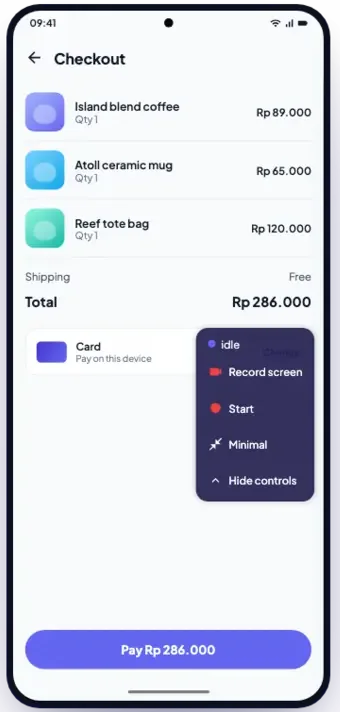
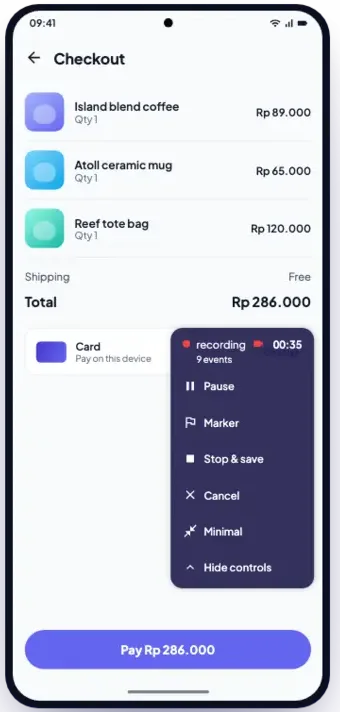
    A floating control sits on top of your debug build. Start a session on the screen you are testing. It records CPU, memory, frame times, network, battery, thermal state, storage, file changes, lifecycle, your own events and, if you ask, the screen.

    Checkout screen of a debug build with the Blackbox recorder menu open: Record screen, Start, Minimal, Hide controls.The recorder while recording, 00:35 and 9 events, with Pause, Marker, Stop and save, and Cancel.
    session_1791488484028_a7rk2m.bbx888 KB · 1m 29s · Samsung SM-A336E
    • metasession metadata, device, app version
    • metricsCPU, memory, network, battery, thermal, storage
    • framesbuild and raster time for every frame
    • eventslifecycle, your events, markers
    • filesystemfile changes and snapshots
    • summary.jsonthe figures the strip shows
    • recording.mp4the screen, if you recorded it
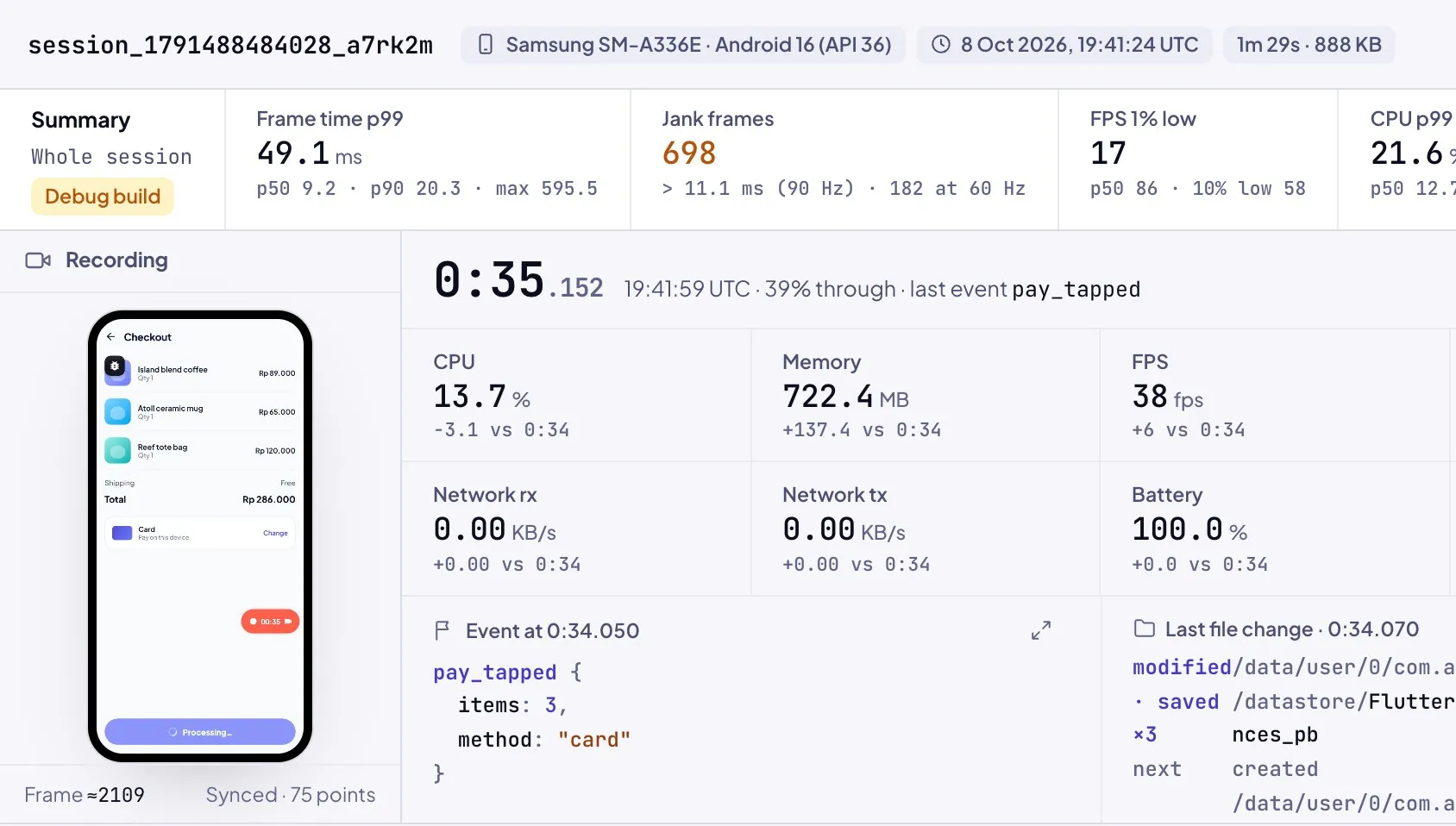
    Blackbox viewer: the summary strip reads frame time p99 49.1 ms, 698 jank frames (over 11.1 ms at 90 Hz, 182 at 60 Hz), FPS 1% low 17, with the recording and the inspector below.
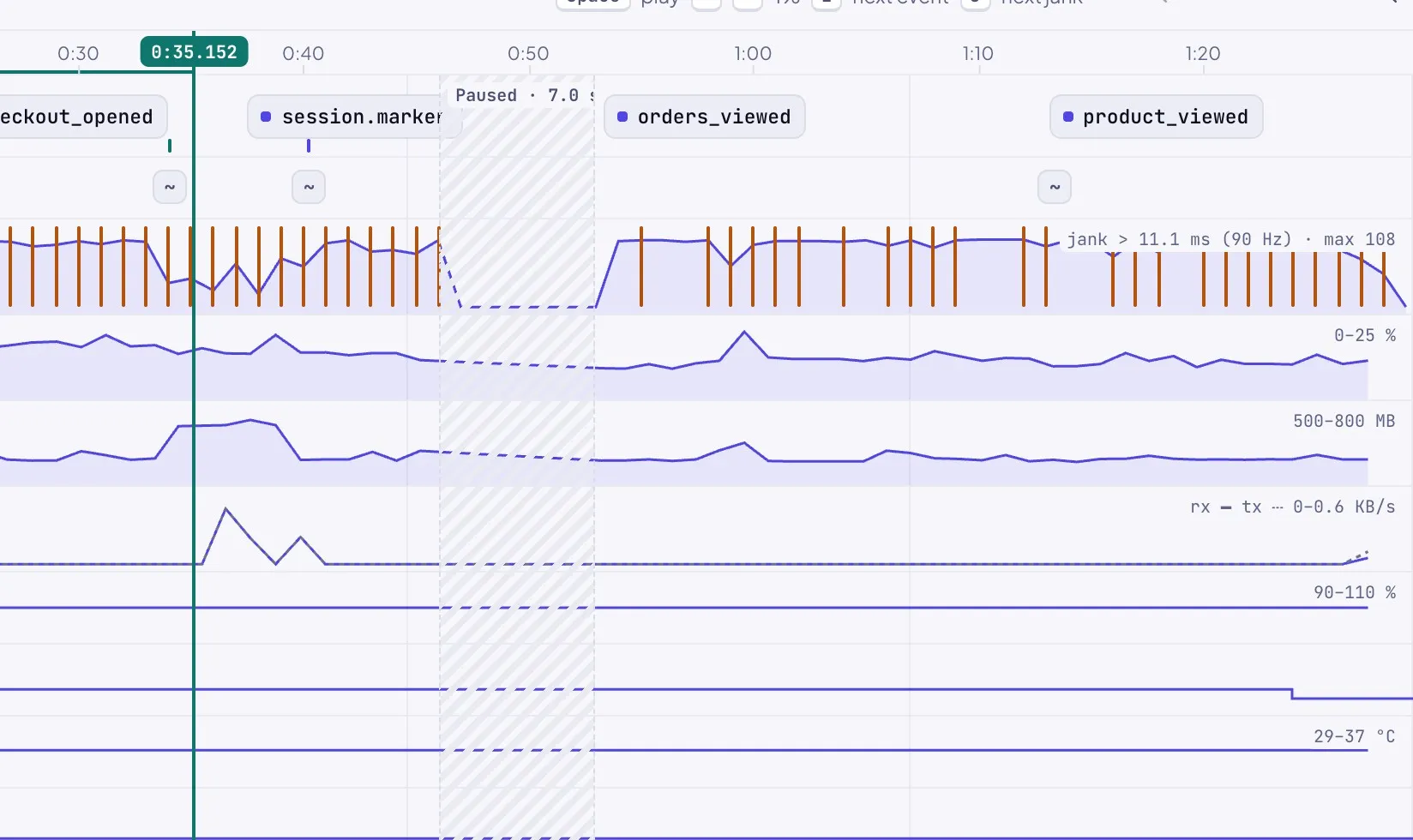
    Blackbox viewer tracks: orange jank lines over the FPS lane, labelled jank over 11.1 ms (90 Hz), and a hatched 7 second pause.
    1. Debug build
    2. Your bucket
    3. Library
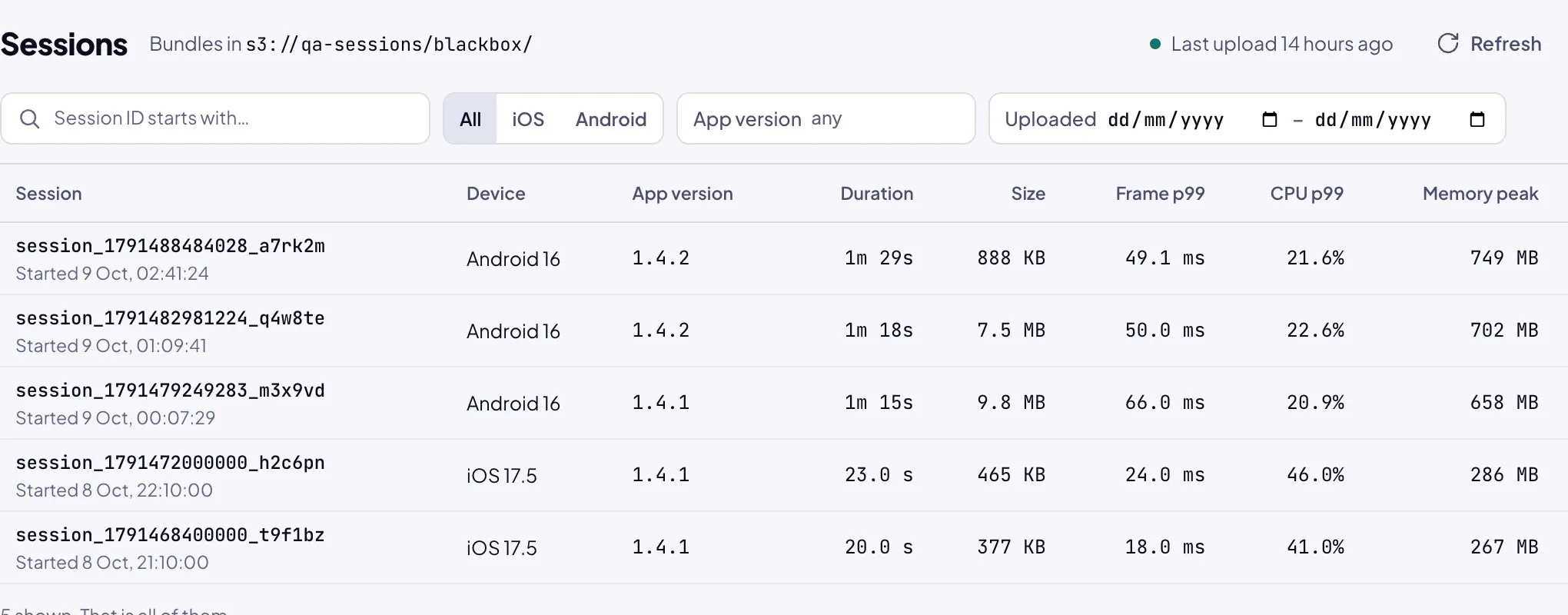
    Blackbox session library for s3://qa-sessions/blackbox/: five sessions with device, app version, duration, size and frame time p99.
  2. Mark the moment, pause the rest

    Tap Marker when something looks wrong, and add a label. Pause while you set up the next step: the viewer shows the pause as a hatched gap on every track.

    Checkout screen of a debug build with the Blackbox recorder menu open: Record screen, Start, Minimal, Hide controls.The recorder while recording, 00:35 and 9 events, with Pause, Marker, Stop and save, and Cancel.
    session_1791488484028_a7rk2m.bbx888 KB · 1m 29s · Samsung SM-A336E
    • metasession metadata, device, app version
    • metricsCPU, memory, network, battery, thermal, storage
    • framesbuild and raster time for every frame
    • eventslifecycle, your events, markers
    • filesystemfile changes and snapshots
    • summary.jsonthe figures the strip shows
    • recording.mp4the screen, if you recorded it
    Blackbox viewer: the summary strip reads frame time p99 49.1 ms, 698 jank frames (over 11.1 ms at 90 Hz, 182 at 60 Hz), FPS 1% low 17, with the recording and the inspector below.
    Blackbox viewer tracks: orange jank lines over the FPS lane, labelled jank over 11.1 ms (90 Hz), and a hatched 7 second pause.
    1. Debug build
    2. Your bucket
    3. Library
    Blackbox session library for s3://qa-sessions/blackbox/: five sessions with device, app version, duration, size and frame time p99.
  3. Stop, and get one .bbx file

    Stop and save writes everything to one .bbx file, a ZIP you can share, attach to a bug or drop into the viewer.

    Checkout screen of a debug build with the Blackbox recorder menu open: Record screen, Start, Minimal, Hide controls.The recorder while recording, 00:35 and 9 events, with Pause, Marker, Stop and save, and Cancel.
    session_1791488484028_a7rk2m.bbx888 KB · 1m 29s · Samsung SM-A336E
    • metasession metadata, device, app version
    • metricsCPU, memory, network, battery, thermal, storage
    • framesbuild and raster time for every frame
    • eventslifecycle, your events, markers
    • filesystemfile changes and snapshots
    • summary.jsonthe figures the strip shows
    • recording.mp4the screen, if you recorded it
    Blackbox viewer: the summary strip reads frame time p99 49.1 ms, 698 jank frames (over 11.1 ms at 90 Hz, 182 at 60 Hz), FPS 1% low 17, with the recording and the inspector below.
    Blackbox viewer tracks: orange jank lines over the FPS lane, labelled jank over 11.1 ms (90 Hz), and a hatched 7 second pause.
    1. Debug build
    2. Your bucket
    3. Library
    Blackbox session library for s3://qa-sessions/blackbox/: five sessions with device, app version, duration, size and frame time p99.
  4. Read every signal on one time axis

    Open the file at /blackbox with any signed-in account. The summary strip sums up the session: frame time p99, jank frames, FPS 1% low, CPU p99 and memory peak. The tracks line up beneath it, with your events and markers on top.

    Checkout screen of a debug build with the Blackbox recorder menu open: Record screen, Start, Minimal, Hide controls.The recorder while recording, 00:35 and 9 events, with Pause, Marker, Stop and save, and Cancel.
    session_1791488484028_a7rk2m.bbx888 KB · 1m 29s · Samsung SM-A336E
    • metasession metadata, device, app version
    • metricsCPU, memory, network, battery, thermal, storage
    • framesbuild and raster time for every frame
    • eventslifecycle, your events, markers
    • filesystemfile changes and snapshots
    • summary.jsonthe figures the strip shows
    • recording.mp4the screen, if you recorded it
    Blackbox viewer: the summary strip reads frame time p99 49.1 ms, 698 jank frames (over 11.1 ms at 90 Hz, 182 at 60 Hz), FPS 1% low 17, with the recording and the inspector below.
    Blackbox viewer tracks: orange jank lines over the FPS lane, labelled jank over 11.1 ms (90 Hz), and a hatched 7 second pause.
    1. Debug build
    2. Your bucket
    3. Library
    Blackbox session library for s3://qa-sessions/blackbox/: five sessions with device, app version, duration, size and frame time p99.
  5. Jank, judged at the real refresh rate

    A frame counts as jank when it misses the device's own budget. On this 90 Hz phone that is 11.1 ms, not a fixed 16.7 ms, and the strip gives both counts: 698 at 90 Hz, 182 at 60 Hz.

    Checkout screen of a debug build with the Blackbox recorder menu open: Record screen, Start, Minimal, Hide controls.The recorder while recording, 00:35 and 9 events, with Pause, Marker, Stop and save, and Cancel.
    session_1791488484028_a7rk2m.bbx888 KB · 1m 29s · Samsung SM-A336E
    • metasession metadata, device, app version
    • metricsCPU, memory, network, battery, thermal, storage
    • framesbuild and raster time for every frame
    • eventslifecycle, your events, markers
    • filesystemfile changes and snapshots
    • summary.jsonthe figures the strip shows
    • recording.mp4the screen, if you recorded it
    Blackbox viewer: the summary strip reads frame time p99 49.1 ms, 698 jank frames (over 11.1 ms at 90 Hz, 182 at 60 Hz), FPS 1% low 17, with the recording and the inspector below.
    Blackbox viewer tracks: orange jank lines over the FPS lane, labelled jank over 11.1 ms (90 Hz), and a hatched 7 second pause.
    1. Debug build
    2. Your bucket
    3. Library
    Blackbox session library for s3://qa-sessions/blackbox/: five sessions with device, app version, duration, size and frame time p99.
  6. Cloud sync to your own bucket Enterprise

    Debug builds upload each finished session straight to a bucket you own. The device holds an upload token that can only write to one project. The bytes never touch Archipelago servers, and release builds carry no token and no uploader.

    Checkout screen of a debug build with the Blackbox recorder menu open: Record screen, Start, Minimal, Hide controls.The recorder while recording, 00:35 and 9 events, with Pause, Marker, Stop and save, and Cancel.
    session_1791488484028_a7rk2m.bbx888 KB · 1m 29s · Samsung SM-A336E
    • metasession metadata, device, app version
    • metricsCPU, memory, network, battery, thermal, storage
    • framesbuild and raster time for every frame
    • eventslifecycle, your events, markers
    • filesystemfile changes and snapshots
    • summary.jsonthe figures the strip shows
    • recording.mp4the screen, if you recorded it
    Blackbox viewer: the summary strip reads frame time p99 49.1 ms, 698 jank frames (over 11.1 ms at 90 Hz, 182 at 60 Hz), FPS 1% low 17, with the recording and the inspector below.
    Blackbox viewer tracks: orange jank lines over the FPS lane, labelled jank over 11.1 ms (90 Hz), and a hatched 7 second pause.
    1. Debug build
    2. Your bucket
    3. Library
    Blackbox session library for s3://qa-sessions/blackbox/: five sessions with device, app version, duration, size and frame time p99.

What you generate

A monorepo you would have built yourself, given a quarter.

Each feature is an island: its own package, its own DI scope, its own tests. Shared infrastructure is the water between them.

Split only where it pays

A feature gets an API/Impl split when other features use it or its vendor can change. Debug tools get a noop twin for release builds. Everything else stays one package.

features/auth/auth_api/the contract other features importauth_impl/REST, Firebase or Supabaseapp_debugger/app_debugger/debug buildsapp_debugger_noop/release buildscheckout/one package, nothing to swapinfrastructure/analytics_api/mixpanel_analytics_impl/

Vendors behind one interface

Analytics
Firebase, Mixpanel, MoEngage, AppsFlyer
Monitoring
Sentry, Crashlytics, New Relic, Grafana
Push
FCM, OneSignal
Feature flags
Remote Config, Flagr
Network
Dio, http

Your state management

Each feature brick asks which one you use, and generates its pages for it.

  • BLoC
  • Cubit
  • Riverpod
  • Provider

An in-app debugger panel

A draggable button opens tabs for what the app is doing right now. Pro and, for the tinted tabs, Enterprise

  • Network
  • Analytics
  • Storage
  • Bridge
  • WebSocket (Enterprise)
  • MQTT (Enterprise)
  • Feature flags (Enterprise)
  • Blackbox (Enterprise)
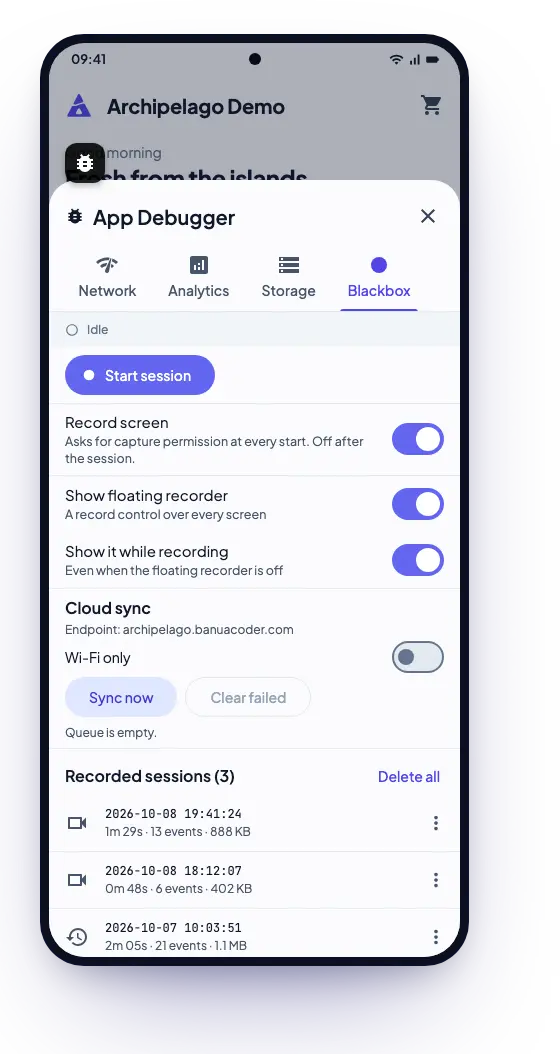
The debugger panel on a phone, open on the Blackbox tab.

CI from the first commit

GitHub Actions or GitLab CI, plus Fastlane lanes for the Play internal track and TestFlight. Push a mobile/v* tag and the release workflow builds the production flavor.

Ready for coding agents

Generated projects ship the context agents need to follow the architecture.

  • CLAUDE.md
  • AGENTS.md
  • .cursorrules
  • .claude/
The brick catalogue76 bricks: 50 Free, 20 Pro, 6 Enterprise Each one is versioned on its own. Generate the ones you need, when you need them. Browse all bricks

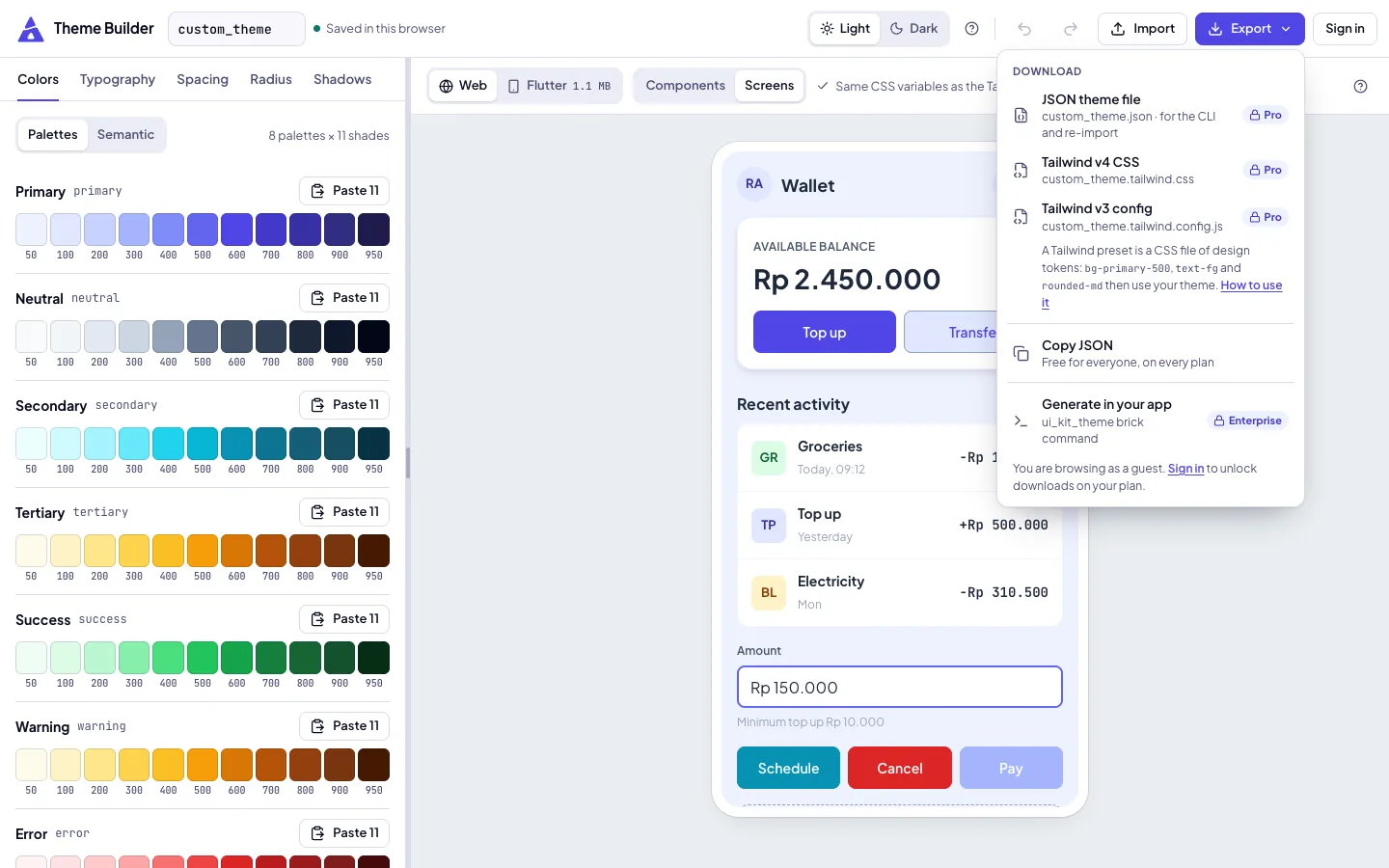
Theme Builder

Tune your design tokens, and see them on real widgets.

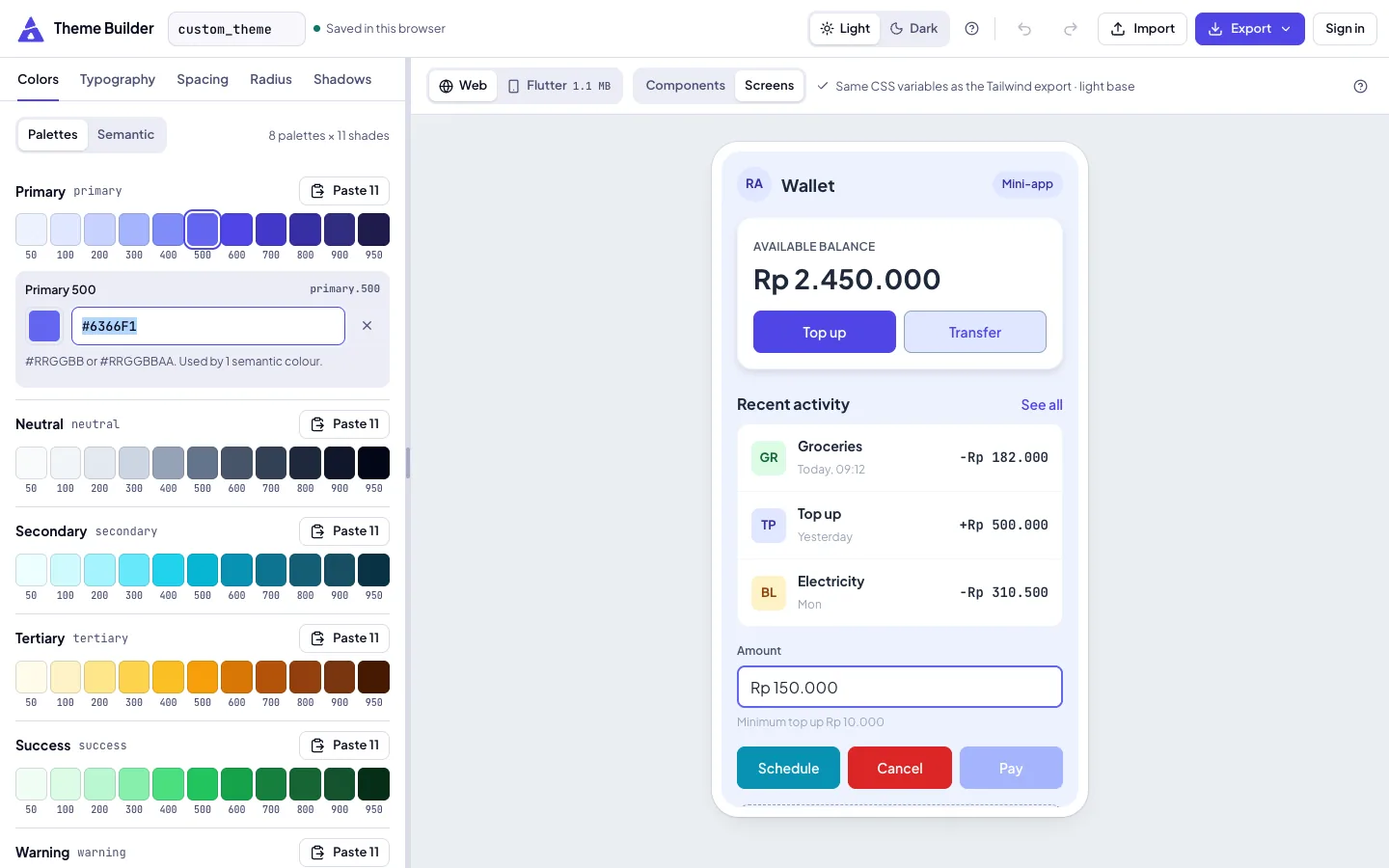
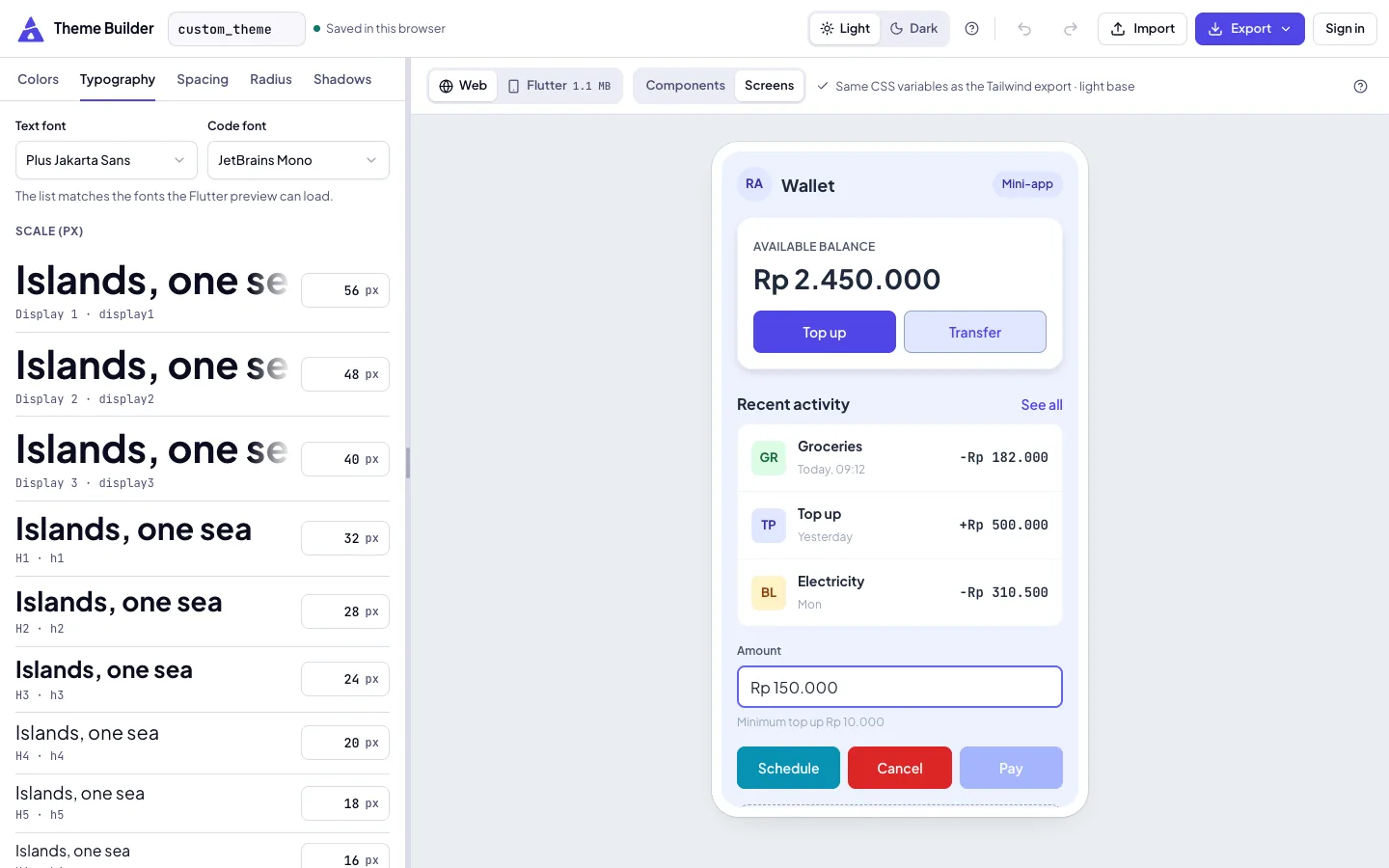
Colors, typography, spacing, radius and shadows, previewed on Material components in light and dark. It is a Flutter app running in your browser.

  • Free to use, no account needed.
  • JSON export needs Pro.
  • The ui_kit_theme brick is Enterprise. For now you paste the token values into it by hand.
Open the Theme Builder
Theme Builder, Colors tab: palettes of 11 shades from 50 to 950 next to the live web preview of a mini-app wallet.
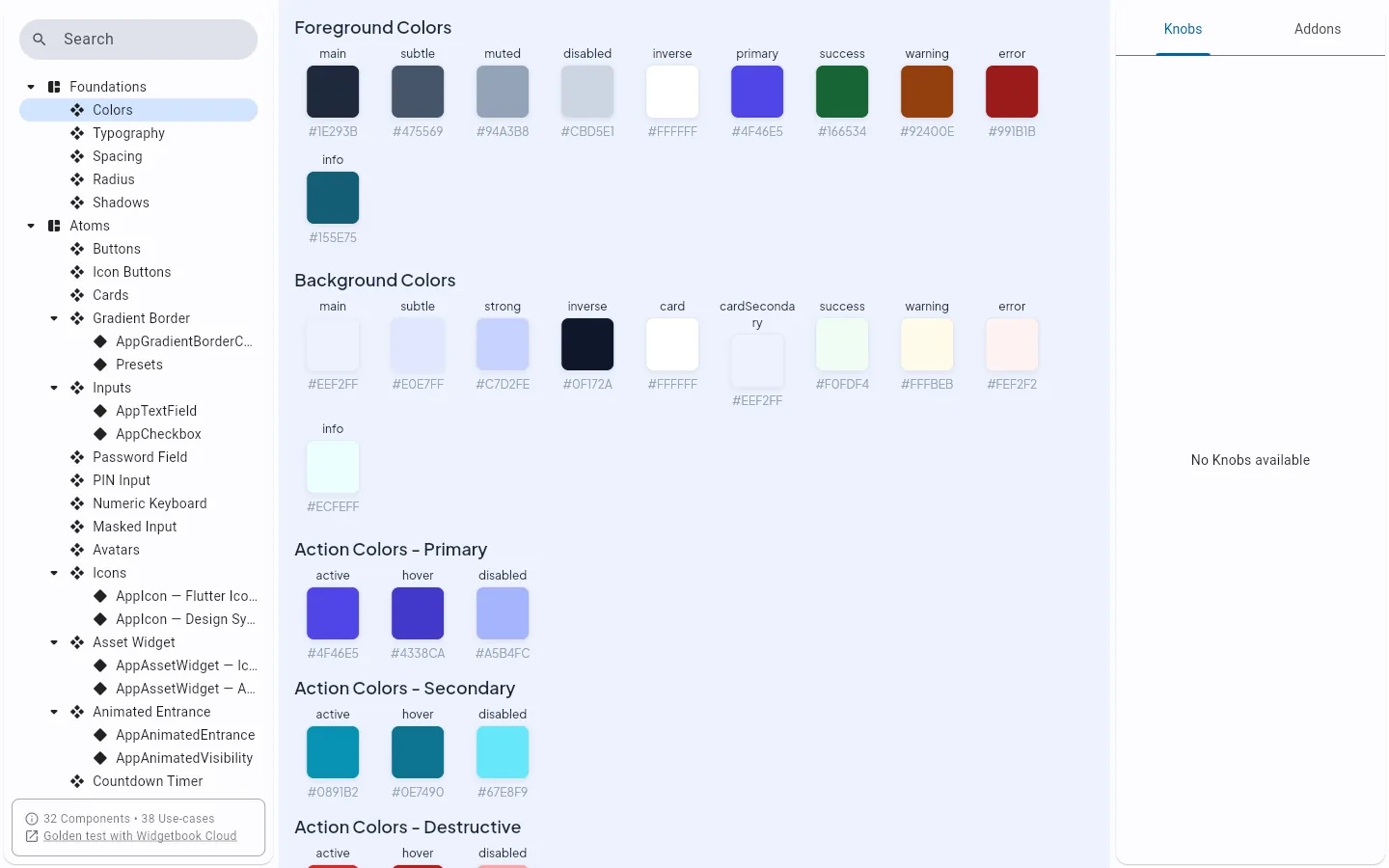
Showcase (Widgetbook): the Colors foundation.

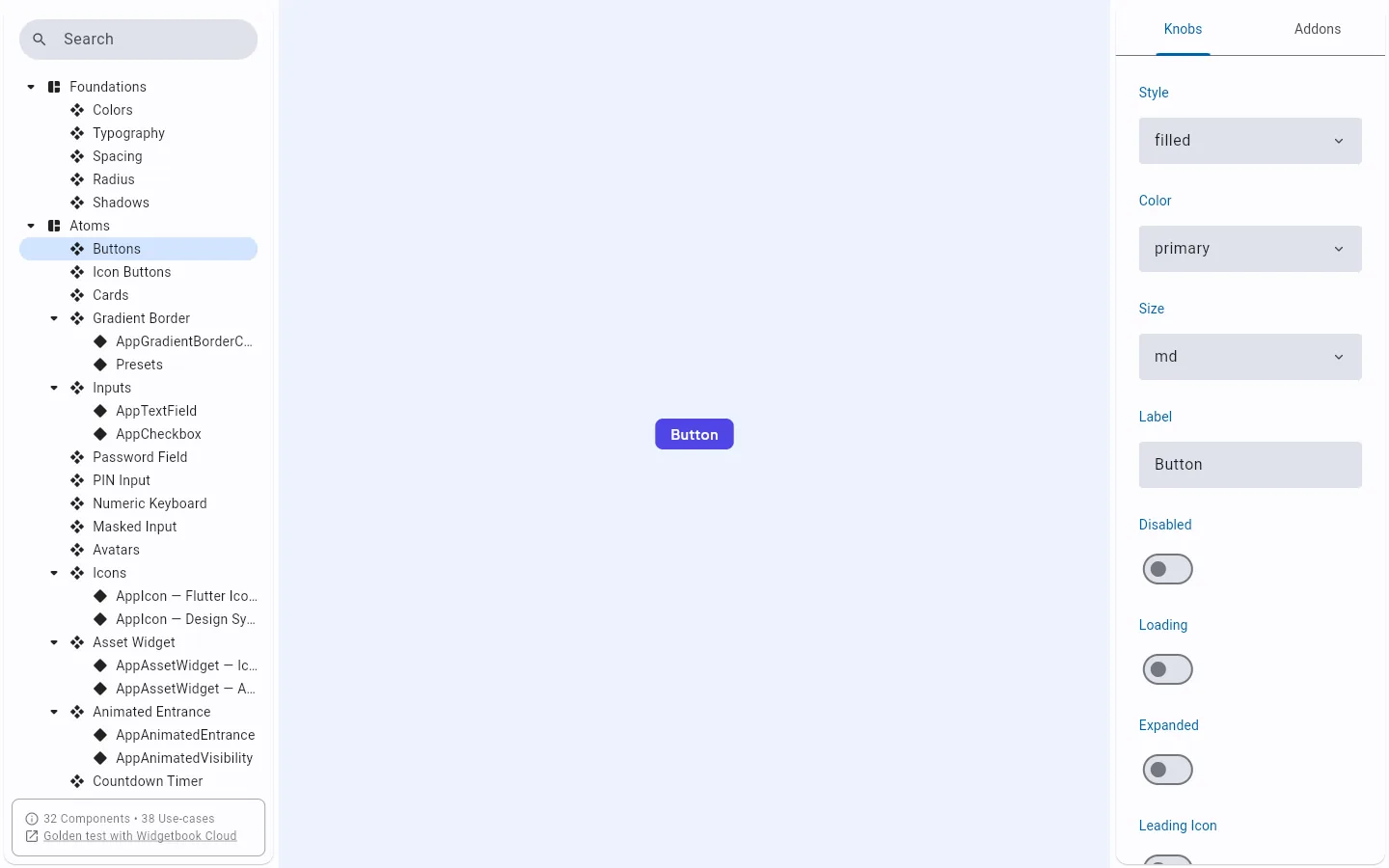
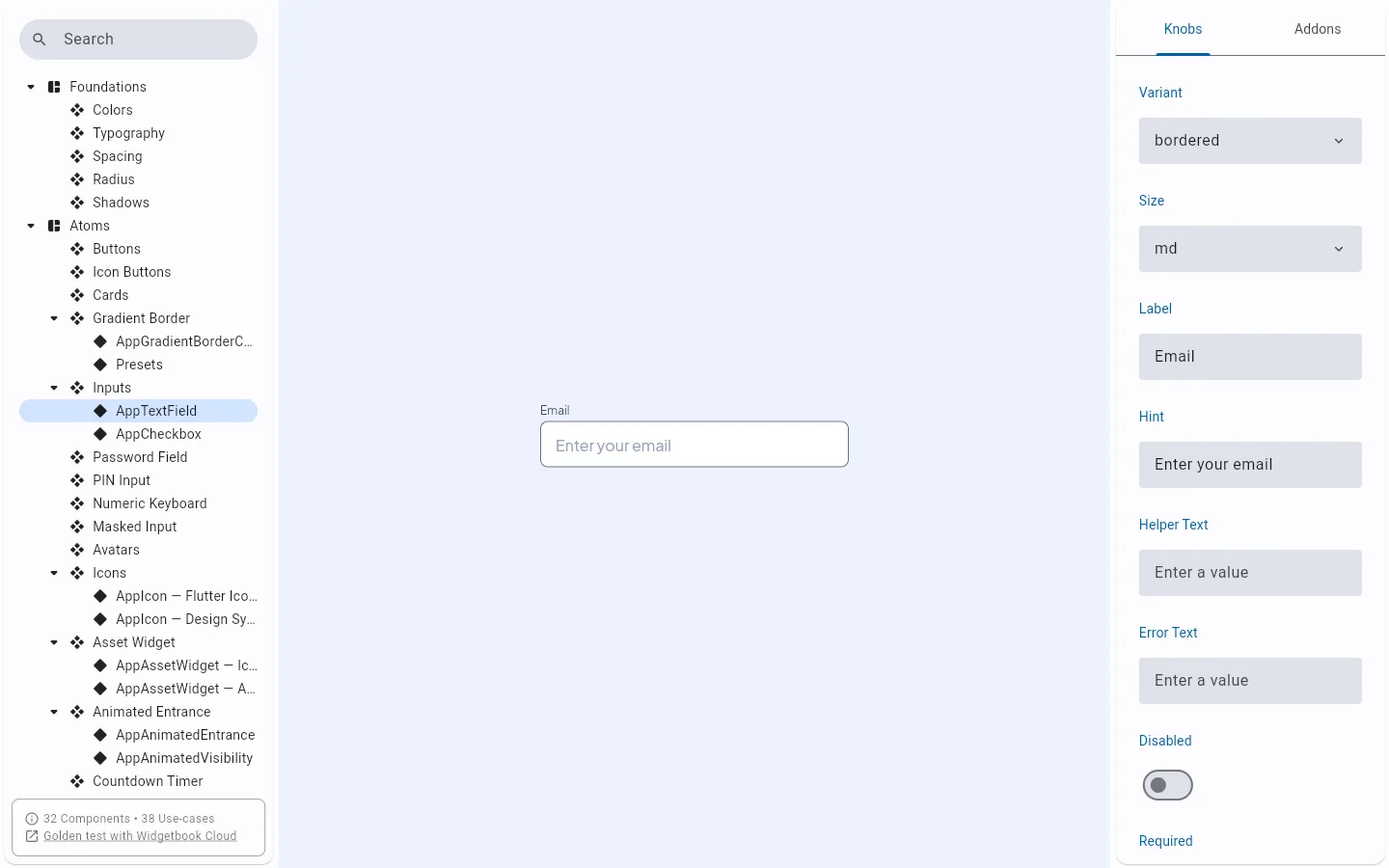
Showcase

Every UI kit widget, live before you generate it.

The Showcase is the UI kit's Widgetbook, built for the web. Browse the foundations and the atoms, from buttons and cards to PIN input and avatars, and try their knobs.

Open the Showcase (opens in a new tab)

Compared

A generator, not a template you outgrow.

  • Pick only the modules you need

    Archipelago: One brick per feature, generated on demand

    Starter template
    Delete what you do not need
    From scratch
    Build each one
  • Add a feature after day one

    Archipelago: archipelago generate, wired into DI

    Starter template
    Copy it in by hand
    From scratch
    Build it
  • Debug tools out of release builds

    Archipelago: build-prepare release swaps in noops

    Starter template
    Usually not handled
    From scratch
    Write the swap yourself
  • Flavors and env per flavor

    Archipelago: dev, staging, prod; one .env per flavor

    Starter template
    Sometimes
    From scratch
    Configure each platform
  • CI and store releases

    Archipelago: Actions or GitLab CI, plus Fastlane

    Starter template
    Sometimes
    From scratch
    Write the pipelines
  • Staying current

    Archipelago: Bricks are versioned; the CLI tells you about updates

    Starter template
    Your fork drifts
    From scratch
    All on you

Pricing

Start free. Pay once when you need more.

The CLI and 50 bricks are free. Pro and Enterprise add bricks, tooling and support.

Free

Everything you need to get started.

$0/forever

  • 3 full project scaffolds per month
  • CLI toolkit & code generation
  • 50 bricks including devtools & CI automation
  • Monorepo architecture with Melos
  • CI/CD templates (GitHub Actions + Fastlane)
  • Community Discord support
  • Documentation & tutorials

Pro

Recommended

For professional Flutter developers.

$79one-time

  • Everything in Free
  • Unlimited project scaffolds
  • 70 bricks (20 more than Free, including the debugger suite)
  • Test coverage pipeline with thresholds
  • File size guard enforcement
  • Image asset optimizer (SVG, PNG, JPEG)
  • AI chat SDK (streaming, OpenAI/Anthropic)
  • Priority support via in-app support tickets
  • Early access to new bricks

Enterprise

Full source access and scale-grade tooling for teams.

$199one-time

  • Everything in Pro
  • Unlimited project scaffolds
  • All 76 bricks
  • Affected package detection (CI optimization)
  • Blackbox recorder and cloud sync to your own bucket
  • Advanced theme variant management
  • Full source code access
  • Enterprise GitHub repository access
  • Highest-priority support via in-app support tickets
  • Onboarding help on request
  • One-time purchase, no subscription
  • 30-day refund window
  • Checkout by Lemon Squeezy

Compare every plan feature

FAQ

Questions, answered.

Something missing? Ask in the Discord.

What exactly do I get with Archipelago?

A CLI that generates a Flutter monorepo with production architecture, CI/CD, flavors and env management, and a monorepo toolkit in devtools/. You then add features one brick at a time. The patterns come from years of building fintech apps with more than 20 million daily active users.

Is this just another starter template?

No. A template is a snapshot you fork and maintain. Archipelago generates code from Mason bricks, and each brick is versioned on its own. You generate only the features you need, when you need them.

Can I add features to a project later?

Yes. Run `archipelago generate <brick>` in a project you made with `archipelago create`. The brick scaffolds the package and its hook wires it into your app.

What is free, and what do I pay for?

There are 76 bricks: 50 Free, 20 Pro and 6 Enterprise. The CLI and the Free bricks cost nothing. Pro adds bricks such as the debugger suite, the test coverage pipeline, the size guard and the asset optimizer. Enterprise adds affected-package detection, advanced theming, the Blackbox recorder and cloud sync, and source access.

Is it a subscription?

No. Pro and Enterprise are one-time purchases, paid through Lemon Squeezy. If it is not right for you, you can ask for a refund within 30 days of your order.

How do I get access to the Enterprise GitHub repository?

After you buy Enterprise, open Dashboard, then Profile, and enter your GitHub username. An invitation goes to that account within seconds. Accept it from your GitHub notifications. If you change your GitHub handle later, update the field and the new account is invited while the old one loses access.

Which Flutter version does it support?

Archipelago targets the latest stable Flutter SDK. The bricks are tested and updated with each stable release.

Your first island is one command away.

The CLI and the Free bricks cost nothing. Install it from pub.dev, sign in with archipelago auth login, run archipelago create, and start on the product, not the plumbing.

dart pub global activate archipelago_cli