

Feature SDKs (Pro)
app_debugger Pro
- Tier
- Proversion 2.0.10
- Command
archipelago generate app_debugger- Generates
features/app_debugger/app_debuggerfeatures/app_debugger/app_debugger_apifeatures/app_debugger/app_debugger_noop
- Generates first
- test_prereqwhen needed and missing, so there is nothing to install first
- Depends on
- shared_app_config, shared_identifiersgenerate these first
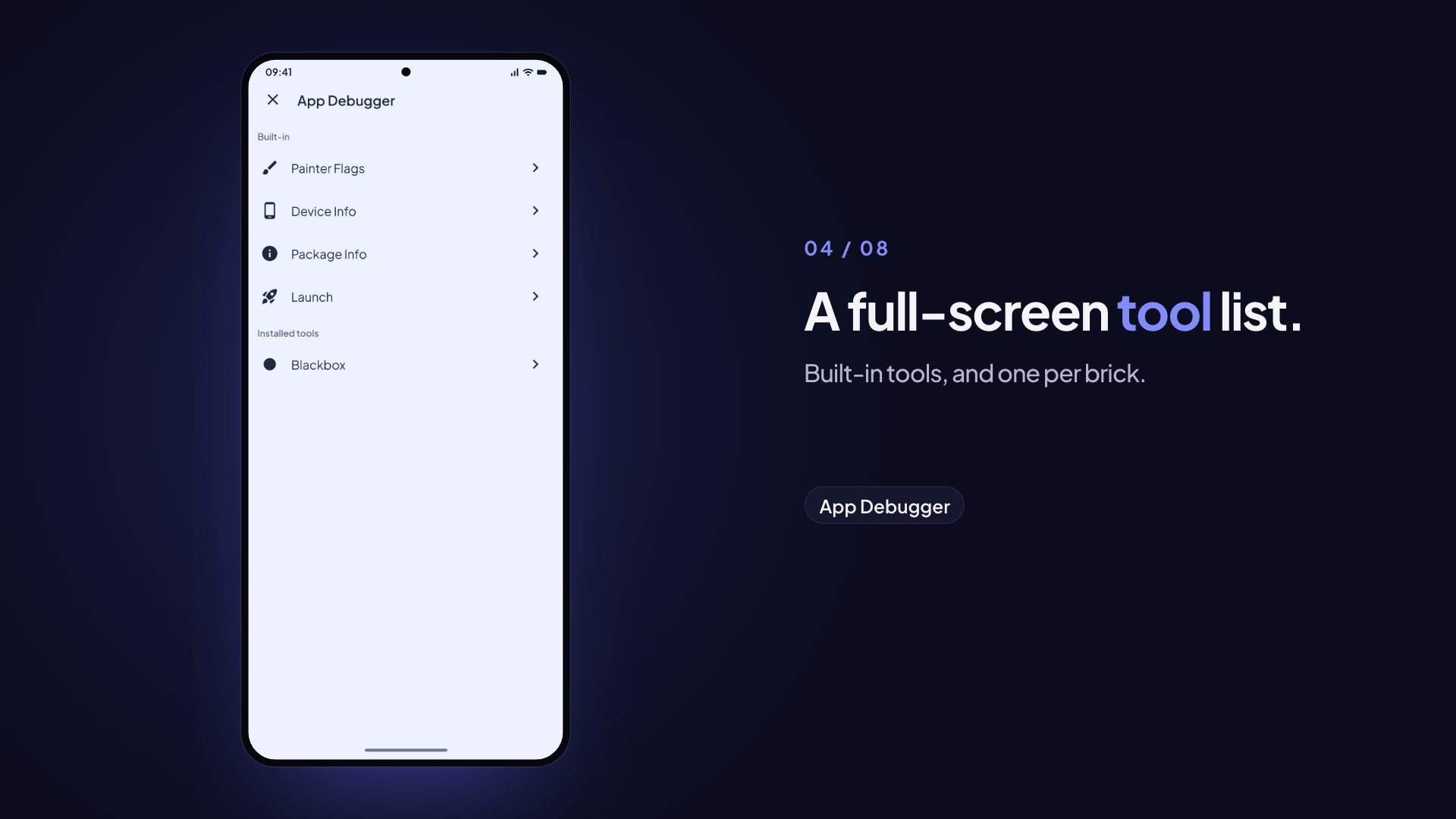
In-app developer tools — a draggable FAB opens a full-screen debugger that lists its tools (10 painter debug toggles, device/package info, the launch timeline) and every
app_debugger_*sub-brick's tool, each opened on its own route.build_prepareswaps to a fully inert noop in production-flavor builds; internal flavors keep it, also in release mode.
Variables
| Variable | Type | Default | Description |
|---|---|---|---|
| uiKitPackageName | string | app_ui_kit | Name of the UI kit package (resolved from archipelago.yaml project.ui_kit_package_name; auto-detected from packages/*_ui_kit when missing) |
| prefix | string | App | UI kit class prefix, for example Acme for AcmeTheme. pre_gen reads it from archipelago.yaml (project.prefix), so you rarely set it |
Install
Interactive
archipelago generate app_debuggerNon-interactive (CI)
archipelago generate app_debugger --config my_config.jsonpre_gen self-generates test_prereq first (via SubBrickGenerator) if it is not already installed — app_debugger's own test suite depends on test_prereq's TestPrerequisite contract.
Generated Packages
| Package | Purpose |
|---|---|
app_debugger_api | Shared AppDebuggerSDK contract, DebugOverlayHost, DebugOverlayPort, DebuggerPanelPageRegistry, DebuggerPanelPage — ships in every flavor |
app_debugger | Debug implementation — FAB overlay, shared debug Navigator host, debugger home and tools, cubits |
app_debugger_noop | Production-flavor stub — all methods no-op. Its testing.dart mirrors app_debugger/testing.dart (a no-op AppDebuggerTestPrerequisite), so test imports still resolve after the swap |
Generated Structure
features/
└── app_debugger/
    ├── app_debugger_api/
    │   └── lib/src/
    │       ├── app_debugger_sdk.dart
    │       ├── debug_overlay_host.dart
    │       ├── debugger_panel_page.dart
    │       ├── debugger_panel_page_registry.dart
    │       └── models/                   # DebuggerConfig, PainterFlag
    ├── app_debugger/
    │   └── lib/src/
    │       ├── app_debugger_sdk_impl.dart
    │       ├── di/                       # incl. debug_tools.dart (sub-brick marker regions)
    │       ├── testing/                  # AppDebuggerTestPrerequisite
    │       └── presentation/
    │           ├── cubits/               # PainterFlagsCubit, FabPositionCubit
    │           ├── fab/                  # DraggableFab
    │           ├── debug_navigator_host.dart
    │           ├── debugger_overlay.dart
    │           └── panel/
    │               ├── debugger_home_page.dart  # DebuggerHomePage, DebuggerToolPage
    │               └── pages/            # PainterFlagsPage, DeviceInfoPage, PackageInfoPage, launch/
    └── app_debugger_noop/
        └── lib/src/
            └── di/
Public API
final sdk = getIt<AppDebuggerSDK>();

// Toggle a painter flag (persists across restarts via hydrated_bloc)
sdk.setPainterFlag(PainterFlag.repaintRainbow, enabled: true);
sdk.isPainterFlagEnabled(PainterFlag.repaintRainbow); // true

// Open the debugger directly — e.g. from a Quick Action / app-icon shortcut.
// Takes no BuildContext: it pushes onto the shared debug Navigator itself.
await sdk.openMenu();
Wiring into MaterialApp
Generation wires the overlay. The brick's post_gen fills the archipelago:app_builder marker region in apps/<app>/lib/app.dart (shipped by flutter_modular_monorepo and app_scaffold), so MaterialApp.router gets:
    // archipelago:app_builder:start
    builder: (context, child) => GetIt.instance<AppDebuggerSDK>().overlay(
      child: child ?? const SizedBox.shrink(),
    ),
    // archipelago:app_builder:end
It imports app_debugger_api and dependencies/di.dart only, never the swappable app_debugger/app_debugger_noop. Running the brick again does not add a second builder:. The brick also generates apps/<app>/test/app_debugger_overlay_test.dart, which pumps the real app widget and expects the FAB. It is generated only when app.dart is the generated shape (a widget that takes AppRouter router); an app on MaterialApp(home:) or another router does not get it, because the test builds the app with AppRouter(registry). The test uses your app theme: if it loads fonts from the network, bundle them for tests, or the test fails offline. If app.dart has no marker pair, the hook warns and prints the line to add by hand; if the region already holds another builder:, it leaves it alone.
In internal-flavor builds this renders the draggable FAB, which opens the debugger. In production-flavor builds the noop implementation returns the child unchanged. There is no runtime flavor check: the flavors listed in internal_flavors keep the real implementation, so a flavor you list there (even production) shows the FAB.
The Shared Debug-Overlay Navigator
MaterialApp's builder: mounts content as a structural sibling of the app's own Navigator/Router, not a descendant — so a plain Navigator mounted there has no ModalRoute ancestor, breaks showModalBottomSheet/Navigator.of(context), and can silently defeat the Android back button. A builder-mounted Navigator needs extra care to work around this, so the whole debug-tooling suite shares exactly one such Navigator, owned here:
app_debugger_api'sDebugOverlayHost— a process-wide singleton holding the stableGlobalKey<NavigatorState>(navigatorKey), a derivedValueListenable<bool> isOpenand, since 1.11.0,ValueListenable<Rect?> fabRect(the FAB's resting rect,nullwhile hidden) so other floating debug controls, such as the blackbox record control, keep clear of it. Pureflutter/widgetstypes only — no widget code, since this package ships in release builds too.app_debugger_api'sDebugOverlayPort(2.0.0) — the contract floating debug controls depend on instead ofDebugOverlayHost:fabRect, the debugger's ownnavigatorKey, and theDebugOverlayPort.currentslot.DebugOverlayHostimplements it andAppDebuggerSDKImplinstalls it (??=). The file depends on nothing else in the package, so a customised debugger can copy it in and implement it (see the recorder's Customised debugger).app_debugger'sDebugNavigatorHost— the single widget that actually mounts theNavigatoron that key (while a debug screen is open the app's own routes are blocked, so an Android predictive back swipe pops only the debug screen), composed byDebuggerOverlaybeneath the FAB layer.- Every
app_debugger_*sub-brick pushes ontoDebugOverlayHost.instance.navigatorKey(or hands it to a third-party tool, asapp_debugger_networkdoes with Alice) — no sub-brick mounts its ownNavigator.AppDebuggerSDK.openMenu()itself pushes onto this same key, which is why it no longer takes aBuildContextparameter.
DebugTools.wire() in app_debugger's lib/src/di/debug_tools.dart contains the archipelago:debug_panel_pages marker pair that sub-brick post_gen hooks patch to eagerly resolve their own SDK (so their DebuggerPanelPage registers before first frame). AppDebuggerSDKImpl.initialize() calls it in pre-launch. It lives in app_debugger's own production-stripped package — not the host app's bootstrap.dart — so debug-only wiring never touches an always-on file. Since 2.0.0 it is a DI file, so the SDK and its widgets never read GetIt: AppDebuggerSDKImpl takes PainterFlagsCubit, FabPositionCubit and LaunchHistoryCubit by constructor and passes them down, and looks up the host's optional LaunchTraceFeed through findLaunchTraceFeed in the same file. Upgrading a project from before 2.0.0 (ARCHIPELAGO_FORCE=1 or archipelago upgrade app_debugger) moves the wiring for you: pre_gen reads the filled regions (debug_panel_pages, feature_flag_spoofer_delegate, analytics_inspector_interceptor) and the tool imports from the old app_debugger_sdk_impl.dart, and post_gen writes them into DebugTools.wire(). If that fails, post_gen names the panel bricks to run again.
build_prepare Swap
build_prepare:
  mappings:
    - debug: app_debugger
      release: app_debugger_noop
The app only names AppDebuggerPackageModule and the AppDebuggerSDK contract, which both packages define, so the swap changes the dependency and its import and nothing else:
dependencies: # … app_debugger: path: ../../features/app_debugger/app_debuggerimport 'package:app_debugger/app_debugger.dart';// … externalPackageModulesBefore: [ // … ExternalModule(AppDebuggerPackageModule),class AppDebuggerSDKImpl(/* … */) implements AppDebuggerSDK { @override bool get isEnabled => true; @override Widget overlay({required Widget child}) => DebuggerOverlay(child: child); @override Future<void> openMenu() async { // Opens the debugger panel. }}The Fastfile runs dart run monorepo_toolkit build-prepare --flavor <flavor> before every build. Internal flavors (development, staging, alpha, beta by default) keep the debugger, also in release mode; the production flavor gets app_debugger_noop. See Build Prepare.
Painter Flags
The Painter Flags tool exposes 10 Flutter rendering diagnostic toggles (state persists across restarts via hydrated_bloc):
| Flag | Description |
|---|---|
repaintRainbow | Flash repainted regions with cycling rainbow colors |
paintBaselines | Show alphabetic and ideographic text baselines |
paintLayerBorders | Draw borders around each compositing layer |
paintPointers | Show pointer (touch/mouse) events as arrows |
paintSize | Overlay bounding box for every render object |
repaintTextRainbow | Flash repainted text areas specifically |
disableClipLayers | Skip clip layer compositing (performance test) |
disablePhysicalShapeLayers | Skip physical shape layers (performance test) |
disableOpacityLayers | Skip opacity layer compositing (performance test) |
profileBuilds | Log widget build times to the console |
The Debugger Page
Tapping the FAB (or calling openMenu()) pushes a full-screen Debugger home onto the shared debug Navigator. Since 2.0.0 it replaces the bottom sheet with tabs.
- The home lists the built-in tools under Built-in and every
DebuggerPanelPageinDebuggerPanelPageRegistryunder Installed tools, by title and icon. It builds no tool. With more than 8 tools it shows a search field that filters by title. - Tapping a tool pushes it as its own route (
DebuggerToolPage: an app bar with the tool's title and a back button, the tool'sbuildas the body). The tool is built only when opened and disposed when popped, so each installed panel brick costs nothing until you open it. - System back pops the tool, then the home, then closes the debugger. It never pops the app's own routes. The close button on the home closes it too.
- The FAB stays hidden while the debugger (or any other debug screen) is open, and
DebugOverlayHost.isOpenandfabRectbehave as before. - The tool routes get the painter-flag and FAB cubits from
DebuggerOverlay's providers above the host Navigator.
Each list row has a key for UI drivers such as Marionette: debugger_tool_<title> (for example debugger_tool_Painter Flags), plus debugger_close and debugger_search.
The floating debugger button has the key app_debugger_fab, so a UI driver can tap it by key instead of by text. The blackbox record control, when app_blackbox_recorder is installed, uses blackbox_record_dot (collapsed) and blackbox_record_menu (expanded).
Built-in Tools
- Painter Flags — Toggle all 10 flags with a list of switches
- Device Info — OS version, screen size, device model (via
device_info_plus) - Package Info — App name, version, build number (via
package_info_plus) - Launch — The app startup as a waterfall or a flame view. See Launch Tool.
Launch Tool
The Launch tool draws the LaunchTrace that launch_tracker_sdk records. Use it to see which startup steps take longest, which delay the first frame, and which ran in parallel or waited in a queue. To learn how to read it, see Read the launch timeline.
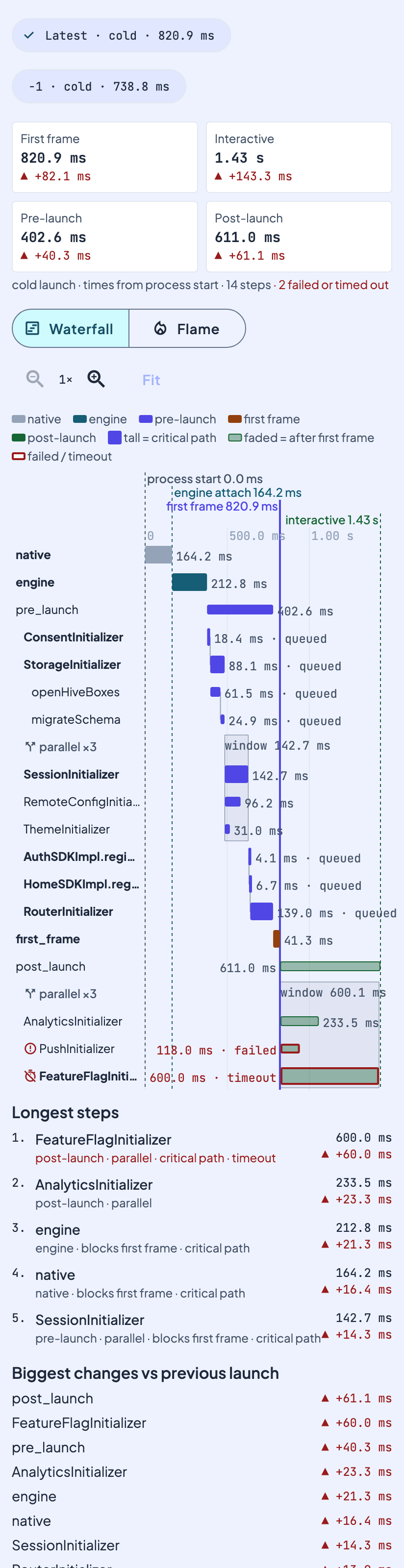
Waterfall (the default view):
- One row per span, in tree order (phase, initializer, sub-step). Each bar starts at its real offset from process start, and its width is its duration. All rows share one time axis. Use the zoom buttons to stretch the axis, and Fit to reset it.
- The bar colour shows the phase: native, engine, pre-launch, first frame, post-launch. A solid bar delays the first frame. A faded bar runs after it.
- A parallel batch has a "parallel ×N" header row and a shaded box that covers the time window of the batch. Steps that waited for the step before them say "queued", and a thin line joins the end of one step to the start of the next.
- Every marker in the trace has a vertical line with its name and offset. The first-frame line is solid. Markers that the tool does not know show their raw key, so markers added by a newer tracker appear without a debugger update.
- Taller bars are on the critical path: the chain of steps that decided when the first frame and interactive happened. In a parallel batch, that is the member that finished last.
- Failed and timed-out spans have a red outline, an icon and the word "failed" or "timeout".
- Tap a bar (or its duration text) to see the span details: name, phase, mode, group, offset, duration, status, parent, whether it blocks the first frame, and whether it is on the critical path.
Flame view: phases on the top row, initializers below them, sub-steps below those. Width is duration and x is the start offset. Parallel members get their own rows, so they never cover each other. Tap a node to zoom into it, tap it again for its details, and use the breadcrumb to zoom out.
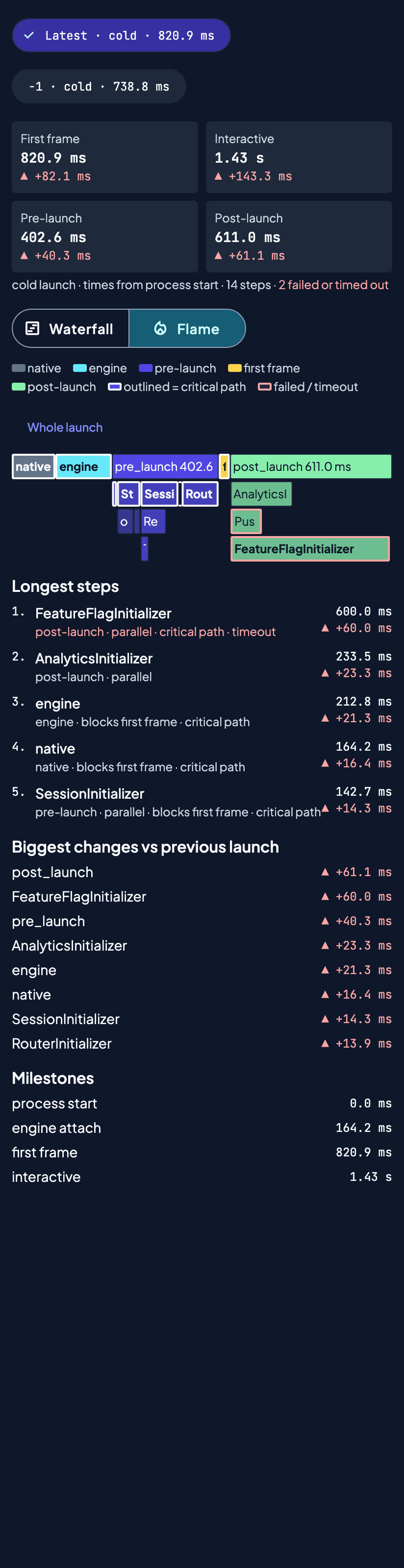
Compare. The debugger keeps the last 5 launch traces (a HydratedCubit, like the painter flags), so they survive a restart. Chips at the top switch between launches. Each total, each of the 5 longest steps, and a "Biggest changes vs previous launch" list show the change against the launch before it, with a sign and an arrow, not only a colour.
Text alternatives. The totals, the ranked list, the milestone list and the details sheet carry everything the colours show. Each bar has a screen-reader label with its name, phase, duration, start, mode, and critical-path and status flags.
No tracker. If no LaunchTraceFeed is registered, the tool explains how to add launch_tracker_sdk instead of crashing. While post-launch is still running, the tool shows the trace so far.
How the tool gets the trace. app_debugger does not depend on the launch tracker. It owns a LaunchTraceFeed port in app_debugger_api that carries LaunchTrace v1 JSON: the finished trace, the trace so far, and a stream that emits the finished trace. The debugger parses that JSON with its own copy of the v1 model. The host app connects the two: LaunchTraceFeedInitializer (in lib/host/initializers/) runs in the pre_launch_initializers marker region, before the Feature SDK sweep initializes the debugger, and registers a TrackerLaunchTraceFeed over AppLaunchTracker only when a tracker is registered. post_gen writes that file and adds it to the region only when infrastructure/app_launch_tracker_impl exists (1.15.0 and later) and has the LaunchTrace API (launch_tracker_sdk 3.1.0 or later; with an older tracker it warns and skips the glue). In a project whose pre_launch_initializer.dart predates the marker regions, post_gen adds them, and it raises the app's environment: sdk: lower bound to 3.13.0 when it is lower, because the glue uses primary constructors. If you add launch_tracker_sdk after the debugger, its post_gen wires the same initializer, so nothing else is needed. The port lives in app_debugger_api, which build_prepare never swaps, so the host glue compiles against app_debugger_noop too.
Sub-Bricks
Additional tools are available as opt-in sub-bricks that register a DebuggerPanelPage with DebuggerPanelPageRegistry and show up on the same Debugger home:
| Brick | Description |
|---|---|
| app_debugger_network | Alice HTTP inspector |
| app_debugger_websocket | WebSocket traffic inspector |
| app_debugger_analytics | Analytics event inspector |
| app_debugger_feature_flag | Runtime flag spoofer |
| app_debugger_storage | Filesystem storage breakdown |
| app_debugger_miniapp | Mini-app JS↔native bridge inspector |
| app_debugger_mqtt | MQTT traffic inspector |
A panel brick hooks into the archipelago:debug_panel_pages marker inside lib/src/di/debug_tools.dart. If app_debugger is not in the project yet, a panel brick generates it first. The app_blackbox_recorder brick does the same.
DI & Wiring
AppDebuggerPackageModuleis declared underarchipelago: di_modulesin the packagepubspec.yamland registered into the app injector bypost_gen; the noop package hand-writes a module with the same class name —build_prepareswaps the pubspec dependency toapp_debugger_noopfor release, not the DI registration itself.AppDebuggerSDKImplis@Singleton(never@LazySingleton):FeatureSDKAppInitializer/PreLaunchInitializerreadsFeatureSDKRegistry.instance.sdksbefore anything else would trigger construction, so a lazy singleton would silently never register.LaunchHistoryCubit(the Launch tool's saved launches) is registered the same way.AppDebuggerSDKImpl.initialize()records each launch's trace when theLaunchTraceFeedemits it.PainterFlagsCubitandFabPositionCubitare@preResolve @lazySingleton— both areHydratedCubits and must wait forHydratedBloc.storageto initialize before construction;AppDebuggerRegisterModuleguarantees this via a shared, once-only_ensureHydratedStorage().
Dependencies
app_debugger package: device_info_plus ^13.2.0, package_info_plus ^10.2.1, flutter_bloc ^9.1.1, hydrated_bloc ^11.0.0, path_provider ^2.1.6, plus the workspace's UI kit package (uiKitPackageName; the debugger home, tool pages and info pages use the typed context extensions and AppAppBar), feature_sdk, router_registry, identifiers, dependencies, and test_prereq (self-generated). app_debugger_api depends only on equatable and feature_sdk. app_debugger does not depend on app_launch_tracker_impl; the Launch tool reads it through the LaunchTraceFeed port (see Launch Tab), and the brick does not generate launch_tracker_sdk.
Platform Setup
None required — device_info_plus/package_info_plus work out of the box on both platforms.
Limitations
- The built-in tools (Painter Flags, Device Info, Package Info, Launch) are always generated; there is no variable to opt out of them.
- The Launch tool needs
launch_tracker_sdk3.2.0 or later (LaunchTrace.markers). Update that brick first in an existing project. - post_gen connects the tracker only when it is installed at that time. Add
launch_tracker_sdklater, and run this brick again to connect it. - The Device/Package Info tools read
device_info_plus/package_info_plusdirectly rather than reusing thepackage_info_providerSDK brick — a minor duplication if both are installed, not a functional bug.
Changelog
Run archipelago brick info app_debugger to see the latest published version. Enterprise customers can read the full CHANGELOG.md in the brick source repository.